Feature Summary
Restore Deleted members to the organization's Contacts, suitable for scenarios such as employee rehiring or recovery from misoperation.
Feature Description
| Feature Dimension | Description |
|---|---|
| Plan Restrictions | No plan restrictions |
| Version Restrictions | No version restrictions |
Steps
Restore Deleted Members
Feature Entry
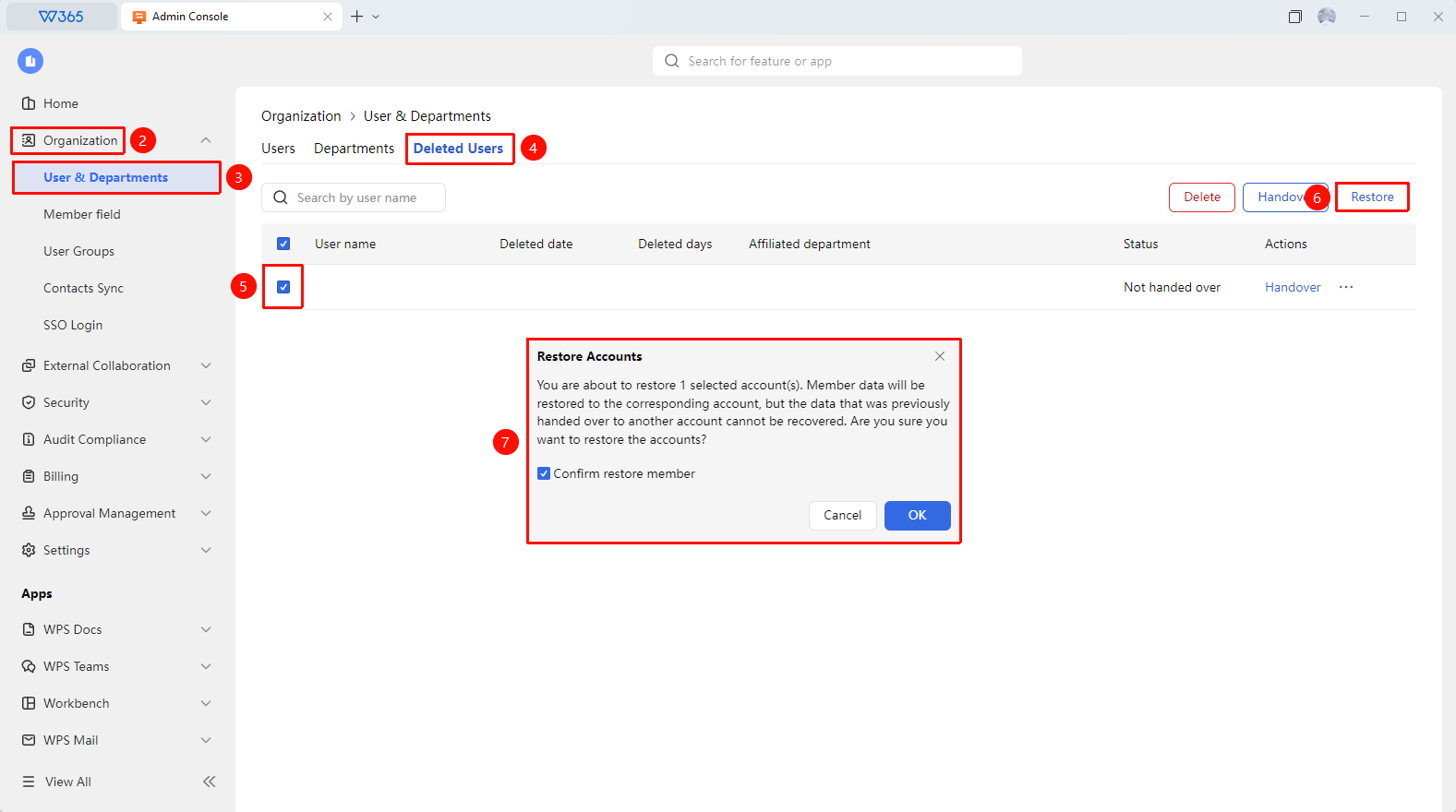
Office Document → Contacts → organizational structure → Deleted Members → Restore
- Open the WPS365 client and click Office Document in the lower-left corner of the client homepage.
- Click 「Contacts」 in the left-side list.
- Click 「organizational structure」 in the drop-down list.
- Switch to the 「Deleted Members」 tab.
- Find the member you need to restore in the Deleted members list.
- Click the 「Restore」 button at the upper right of the page.
- In the pop-up window, check 「Confirm Restore Member」.
- Click 「OK」 to complete the operation.
- After the account is restored, the member's data will be restored to the corresponding account. Data that has been transferred cannot be restored. The member can sign in to the account and use it normally.

FAQ
Q1: After restoring a Deleted member, will their previous document permissions still be in place?
- Solution: If a document transfer was performed upon departure, the original document ownership has been transferred to the recipient and will not be automatically returned after restoration. If no transfer was performed upon departure, the documents remain under the original member's name and can be accessed normally after restoration.
Q2: After how long of a departure period can a member no longer be restored?
- Solution: Deleted members are retained in the 「Deleted Members」 list and must be manually deleted or restored by an Admin.
Q3: What permissions are required to restore a Deleted member?
- Solution: Only the Super Admin or an Admin with Contacts management permissions can restore Deleted members. Regular Admins who have not been granted Contacts management permissions cannot perform this operation.
Notes
- After restoration, the member's permission status will be based on the current Contacts settings.
- It is recommended to promptly check the member's department affiliation and permission configuration after restoration.