Feature Summary
Configure the business card information fields displayed for organization members in Contacts, controlling which information is visible to others
Feature Description
| Feature Dimension | Description |
|---|---|
| Plan Restrictions | No plan restrictions |
| Version Restrictions | No version restrictions |
Operation Steps
Configuring Business Card Display Fields
Feature Entry
Office Document→Contacts→Member Fields→Display Settings
- Open the WPS365 client, and click to enter Office Document in the lower-left corner of the client homepage
- Click 「Contacts」 in the left-side list
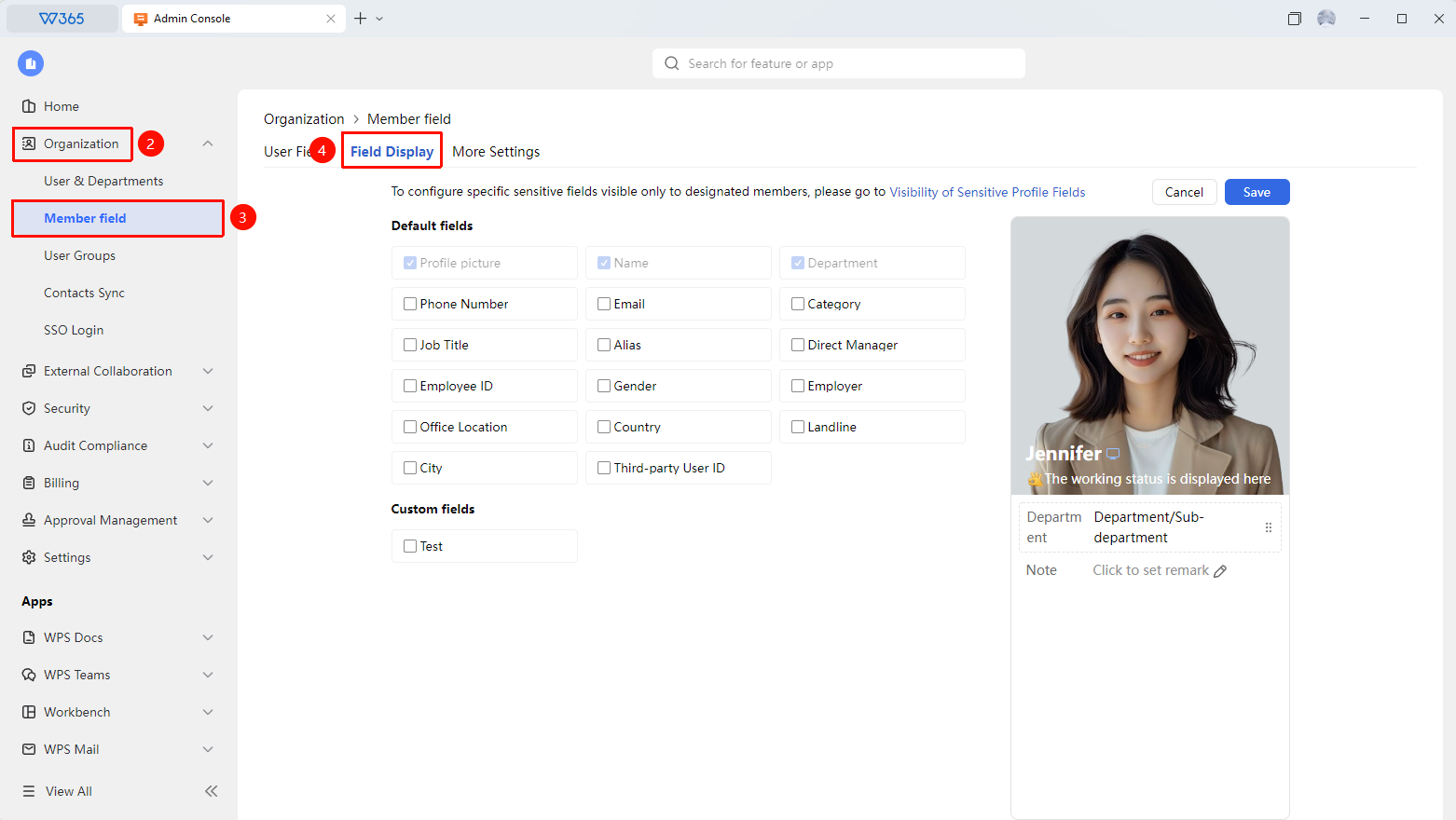
- Click 「Member Fields」, and after entering the page, click 「Display Settings」
- The page lists all displayable business card fields
- Click 「Edit」 to enter business card editing
- Enable or disable the display of each field as needed
- Preview the display effect in the business card preview interface on the right; you can drag to adjust the display order of fields
- Click 「Save」 to complete the configuration
- If you need to configure the field information of certain sensitive members to be visible only to specified members, you can click 「Sensitive Member Business Card Field Visibility」 on the page to proceed with editing

FAQ
Q1: Does the business card display setting take effect for all members?
- Solution: Yes. The business card display rules configured by the Admin will be applied to the Contacts business cards of all members within the organization. The fields seen by all members when viewing colleagues' business cards are consistent.
Q2: Will information be lost if a field display is turned off?
- Solution: No. Turning off a field display only controls that the field is not shown in the Contacts business card. The member's information data is still retained in the system. If you need to display it again, simply enable the corresponding field.
Notes
- The profile picture, name, and department fields are fixed displays and cannot be turned off
- Turning off display does not mean deleting data; the information is still retained
- It is recommended to reasonably configure the displayed fields according to the organization's privacy policy