Feature Summary
View the organization's unique identifier ID, used to verify the organization's identity when integrating with the WPS Open Platform, third-party applications, and technical support.
Feature Description
| Feature Dimension | Description |
|---|---|
| Plan Restrictions | No plan restrictions |
| Version Restrictions | No version restrictions |
Operation Steps
View Organization ID
Feature Entry
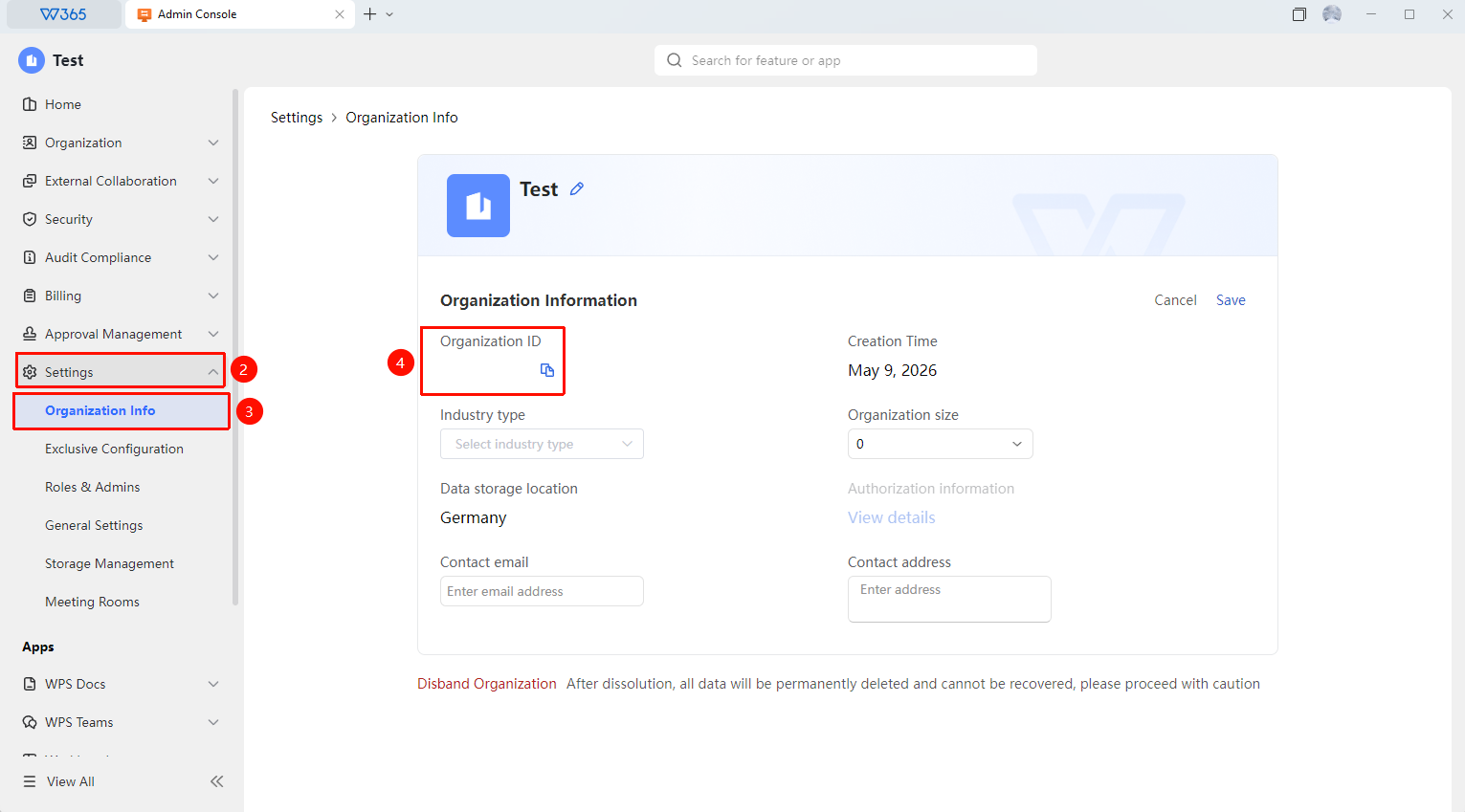
Office Document → Organization Settings → Organization Info
- Open the WPS365 client, and click Office Document in the lower-left corner of the client homepage.
- Click 「Organization Settings」 in the left-side list.
- Click 「Organization Info」 in the drop-down list.
- Locate the 「Organization ID」 field in the organization information area.
- The organization ID is usually a string of numbers and can be copied directly for use.
- When integrating with the open platform or adding third-party applications, enter this organization ID as prompted to complete identity verification.

FAQ
Q1: Can the organization ID be modified?
- Solution: No. The organization ID is a unique identifier automatically generated by the system when the organization signs up. Once created, it cannot be modified. If you need to change the organization ID, you must sign up for a new organization account, but the original data cannot be migrated.
Q2: Is there a security risk if the organization ID is leaked?
- Solution: The organization ID itself is public identification information, used only to identify the organization. Leaking the organization ID alone will not directly cause security issues, but it may pose risks when combined with other sensitive information. It is recommended to keep the organization ID properly stored.
Q3: Where is the organization ID required?
- Solution: The organization ID is mainly used in the following scenarios: configuring the organization identity during WPS Open Platform application development, verifying organization information during third-party application integration, providing identity information when contacting WPS official technical support, and contacting for additional seat purchases or organization plan changes.
Notes
- The organization ID is a unique identifier automatically generated by the system and cannot be modified.
- The organization ID is required when integrating with the open platform or third-party applications.
- The organization ID is located on the organization information page and can be copied directly.