Feature Summary
Set the industry type for your organization to receive tailored feature recommendations and service plans
Feature Description
| Feature Dimension | Description |
|---|---|
| Plan Restrictions | No plan restrictions |
| Version Restrictions | No version restrictions |
Steps
Set Industry Type
Feature Entry
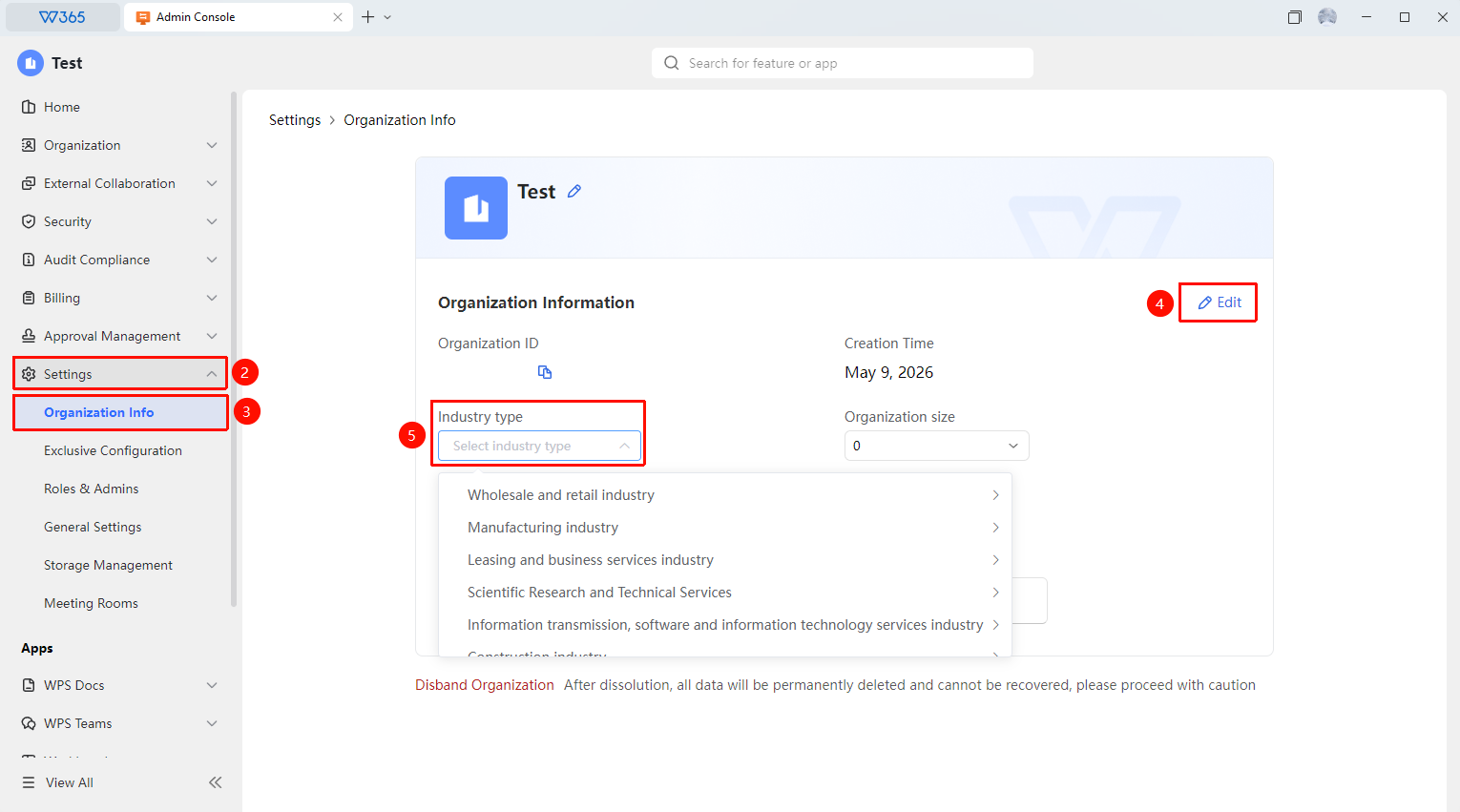
Office Document → Organization Settings → Organization Info
- Sign in to WPS 365 Organization Office Document
- Click 「Organization Settings」 → 「Organization Info」
- In the 「Organization Info」 panel, click 「Edit」
- Select the industry your organization belongs to under Industry Type
- Click 「Save」 to complete the setup

FAQ
Q1: Can I change the industry type if I selected the wrong one?
- Solution: Yes. You can change it by re-selecting the industry type in 「Organization Settings」 → 「Organization Info」 and saving. After modification, the system will recommend tailored service plans based on the new industry.
Q2: What impact does setting the industry type have?
- Solution: The industry type helps the WPS 365 platform provide your organization with targeted feature recommendations, service plans, and best practices. For example, the education industry will receive recommendations for education-specific features, while the finance industry will receive recommendations for stronger security control plans.
Q3: Does the industry type affect feature availability?
- Solution: It does not directly affect feature availability, but it does influence the service plans and smart suggestions recommended by the platform. All feature availability is determined by the plan purchased by the organization.
Notes
- It is recommended to select the industry that best matches your primary business
- If your organization spans multiple industries, simply select the industry corresponding to your primary business
- The industry type is used only for service optimization and will not be displayed publicly
- Changing organization information requires an organization Super Admin account