Feature Summary
Transfer the super admin permissions of a WPS 365 organization to another member. This applies to scenarios such as admin resignation, permission changes, or organization handovers.
Feature Description
| Dimension | Description |
|---|---|
| Plan limits | No plan limits |
| Version limits | No version limits |
Steps
The current super admin must sign in to perform the transfer.
Transferring Super Admin
Feature Entry:
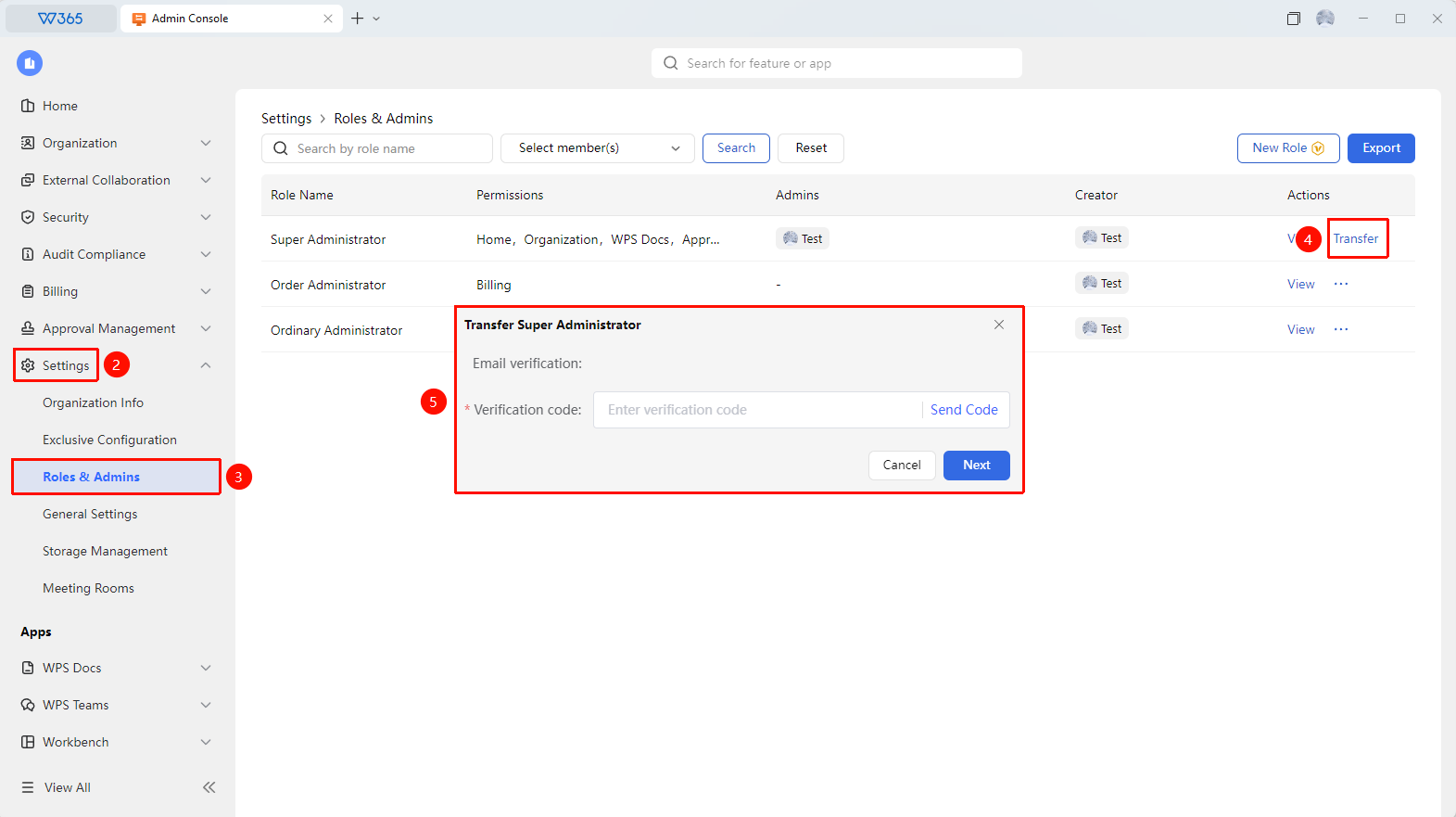
Admin Console > Organization Settings > Admin Permissions > Super Admin > Transfer
- Open the WPS 365 client, and click Admin Console in the lower-left corner of the homepage.
- Click Organization Settings on the left menu to expand the dropdown list.
- Click Admin Permissions in the dropdown list.
- Locate the Super Admin role and click Transfer.
- Select the target member in the pop-up window.
- Complete the verification process as prompted on the page.
- Once confirmed, the super admin permissions will be transferred to the target member immediately.

FAQs
Q1: What are the requirements for transferring the super admin role?
- Solution: Only the current super admin can perform the transfer, and the target member must have already joined the organization. If the target member is not in the organization, add them as an organization member in Contacts first before transferring the role.
Q2: Can the original super admin still manage the organization after a successful transfer?
- Solution: No. After the transfer is complete, the original super admin will automatically become a regular member and will no longer have organization management permissions. If they need to retain some management permissions, the new super admin can assign them other admin roles.
Q3: What should we do if a super admin leaves the organization without transferring the role?
- Solution: If the original super admin is unable to perform the operation, contact WPS 365 Customer Service or technical support. Submit your organization credentials through official channels, and our team will assist you in transferring the super admin permissions. We recommend that organizations plan admin handovers in advance to avoid business disruptions caused by locked permissions.
Notes
- Before transferring the super admin role, ensure that the target member has signed in to WPS 365 using their personal organization account and that their account status is normal.
- The transfer cannot be undone. Verify the identity of the target member carefully before confirming.
- Management permissions associated with the original super admin (such as Teamspace owner) will not be automatically transferred and must be handled separately.
- We recommend backing up organization configuration data, including the admin list, organizational structure, and security policies, before the transfer.
- An organization must retain at least one super admin. We recommend checking if all management permissions are normal after the transfer is complete.