Feature Summary
Set up document transfer reminders for departing employees in advance to prompt timely completion of organization document transfers and account reclamation, ensuring the security of organization data assets.
Feature Description
| Feature Dimension | Description |
|---|---|
| Plan Limit | No plan limits |
| Edition Limit | No edition limits |
Steps
Enable Document Transfer Reminders for Departed Members
Feature Entry:
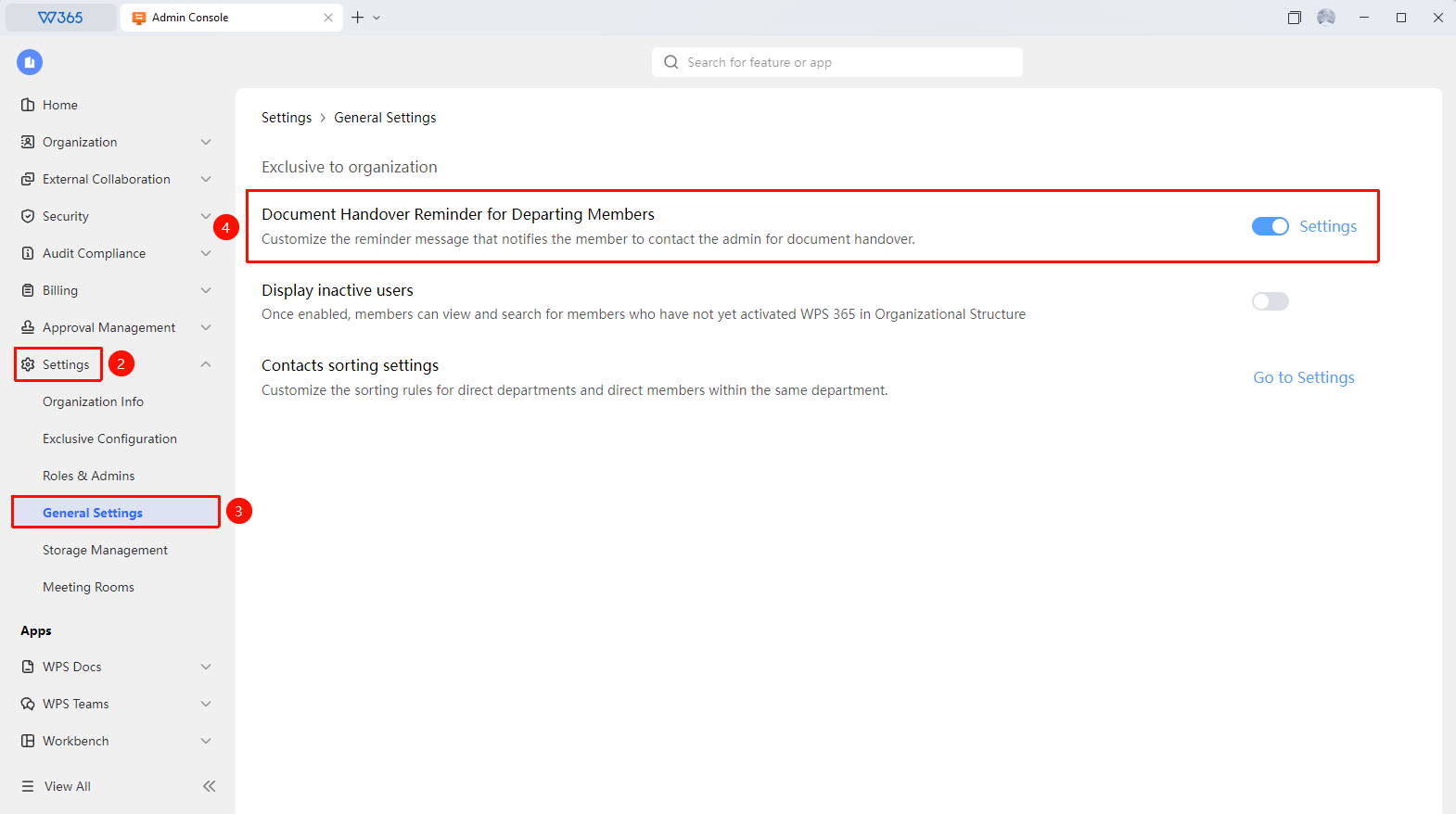
Admin Console > Organization Settings > General Settings
- Open the WPS 365 client, and click Admin Console in the lower-left corner of the homepage.
- Click Organization Settings in the left list to expand the dropdown list.
- Click General Settings in the dropdown list.
- Click to toggle Enable/Disable Document Transfer Reminders for Departing Members.
- Click Set Up on the right to customize the reminder message content.

FAQ
Q1: What is the purpose of document transfer reminders for departed members?
- Solution: Customize the reminder content to guide members to contact the admin to handle document transfers, ensuring a smooth departure and transfer process.
Notes
- We recommend incorporating WPS 365 account reclamation into your standard organization departure process, synchronized with access control and organization email reclamation, to reduce the risk of omission.