Feature Summary
Batch add department members to a team to improve operational efficiency.
Feature Details
| Dimension | Description |
|---|---|
| Plan Limit | No plan limits |
| Version Limit | No version limits |
Operating Steps
Enable "Select All Department Members"
Feature Entry
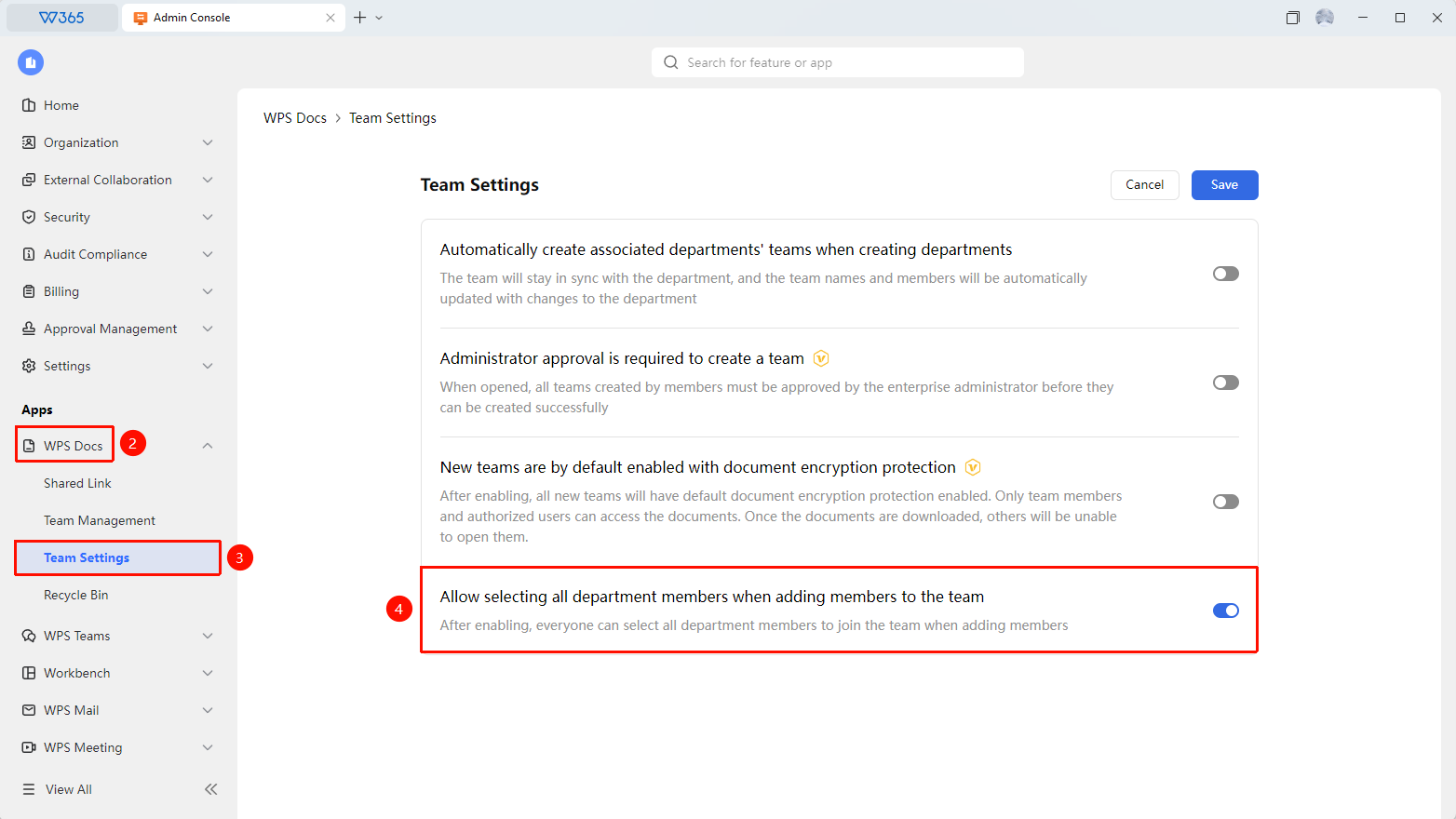
Admin Console > Document & Team > Team Settings
- Sign in to the WPS 365 Admin Console as a super Admin or an Admin with this permission.
- Click Document & Team > Team Settings.
- Locate the Allow selecting all department members when adding members to a team option.
- Turn on the switch.
- After saving, you can select all department members with one click when adding team members.

FAQ
Q1: Does selecting all department members include sub-departments?
- Solution: Yes. The select-all action includes members of the current department and all its sub-departments, ensuring that members under the entire department structure are added.
Q2: Will members who have already joined the team be added again?
- Solution: No. The system automatically filters out members who are already in the team and only adds members who have not yet joined.
Notes
- We recommend using this feature when creating a new department teamspace to quickly complete member initialization.
- The select-all action may add a large number of members to the team. We recommend confirming whether the team has sufficient storage.
- If a department has too many members, we recommend adding them in batches to confirm the permissions of each member.