Feature Summary
View and manage all historical meeting records of the organization, including a unified list of information such as meeting time, host, and meeting code.
Feature Description
| Feature Dimension | Description |
|---|---|
| Plan Limit | No plan limits |
| Version Limit | No version limits |
Steps
View Meeting List
Feature Entry
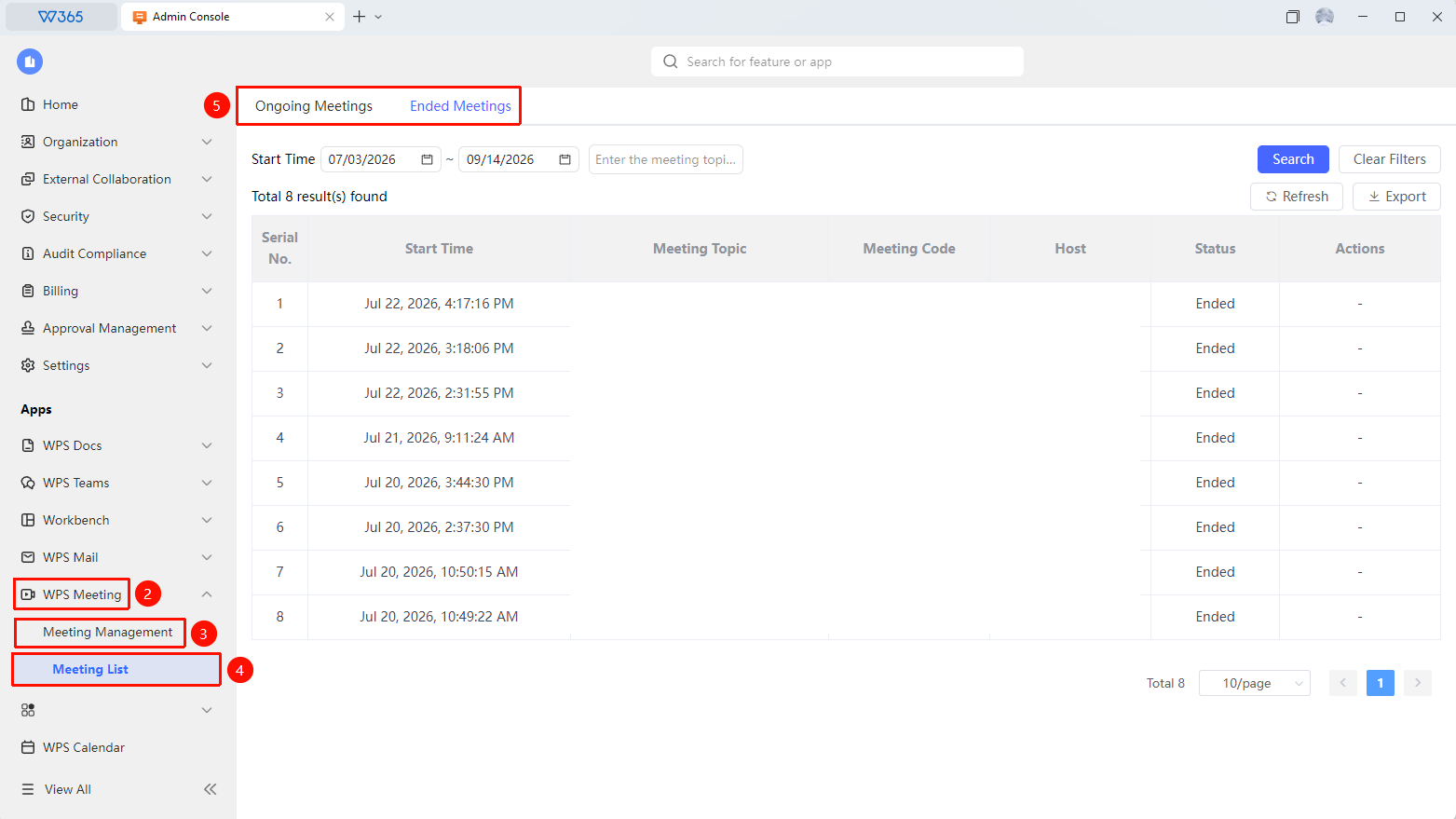
Admin Console > Meeting > Meeting Management > Meeting List
Open the WPS 365 client, and click Admin Console in the lower-left corner of the client home page.
Click Meeting in the left list to expand the dropdown list.
Click Meeting Management > Meeting List in the dropdown list.
The page displays all meeting records held by the organization, including ongoing and ended meetings:
- Meeting Subject: The name of the meeting
- Time: The start time and duration of the meeting
- Host: The creator of the meeting
- Status: Ongoing or Ended
- Recording Status: Whether it has been recorded and the related recording files
Supports filtering and searching by time range, host, meeting subject, and meeting code.
Click Export to export meeting records with one click and generate a sheet file.

FAQ
Q1: Can I view meeting recordings and playbacks in the meeting list?
- Solution: No. You can click meeting records in WPS Teams or WPS Meeting to view playbacks or meeting minutes.
Q2: Can ordinary members view the meeting list?
- Solution: The meeting list is a feature of the Admin Console and can be viewed only by super administrators and administrators with meeting management permissions. Ordinary members cannot view the meeting list from the Admin Console, but they can view meetings they participated in from their personal meeting records in WPS Teams or WPS Meeting.
Notes
- The meeting list only counts meeting records that have been held and are in normal status.
- Meetings that have not started will not appear in the list.
- We recommend regularly exporting records and recording files of important meetings to avoid loss due to expiration.