Feature Summary
When you need to adjust the spacing before and after paragraph text, the indentation feature supports setting the left indent and first-line indent of paragraphs, controlling the spacing between text and page edges to meet layout specification requirements in different scenarios.
Feature Description
| Feature Dimension | Description |
|---|---|
| Membership Restriction | No membership restriction |
| Version Restriction | No version restriction |
Operation Steps
Set Indentation via the Floating Toolbar
Feature Entry
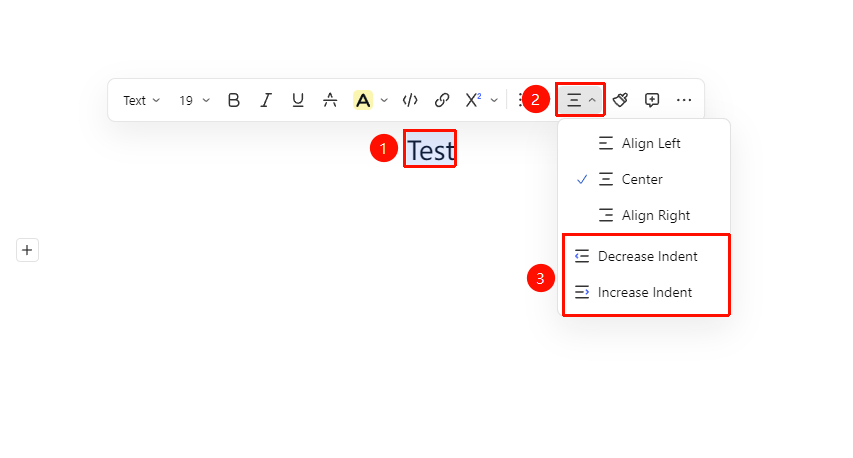
Select paragraph → "Floating Toolbar" → "Alignment & Indentation" button
- Place the cursor in the paragraph where you need to adjust indentation (or select multiple paragraphs of text)
- Find the "Alignment & Indentation" button in the pop-up Floating Toolbar
- Select the "Increase Indent" button or the "Decrease Indent" button
Set Indentation via the Ribbon
Feature Entry
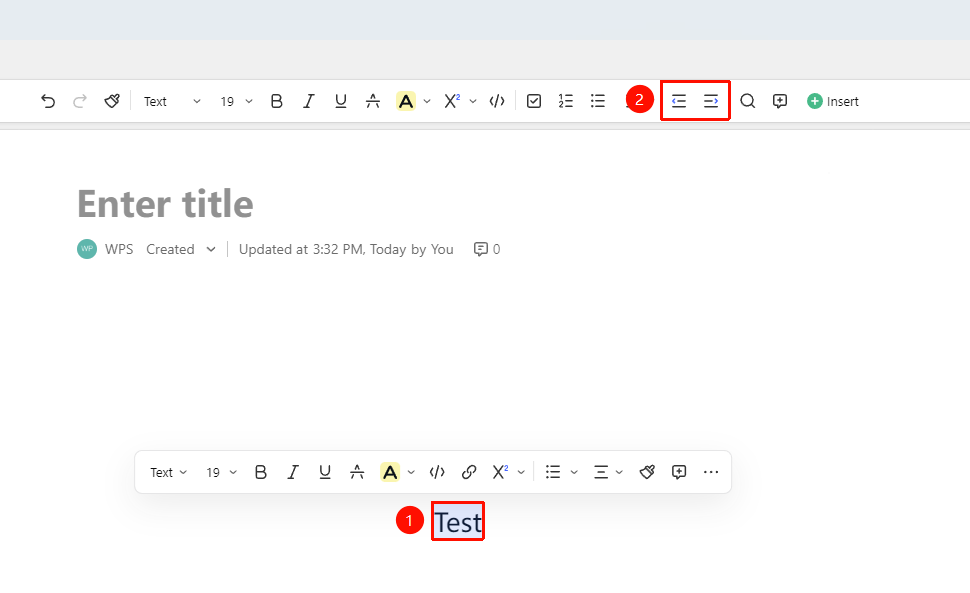
Select paragraph → Top Ribbon → "Increase Indent" / "Decrease Indent" button
- Place the cursor in the paragraph where you need to adjust indentation (or select multiple paragraphs of text)
- In the Top Ribbon, select the "Increase Indent" button or the "Decrease Indent" button
Set Indentation via the Paragraph Handle
Feature Entry
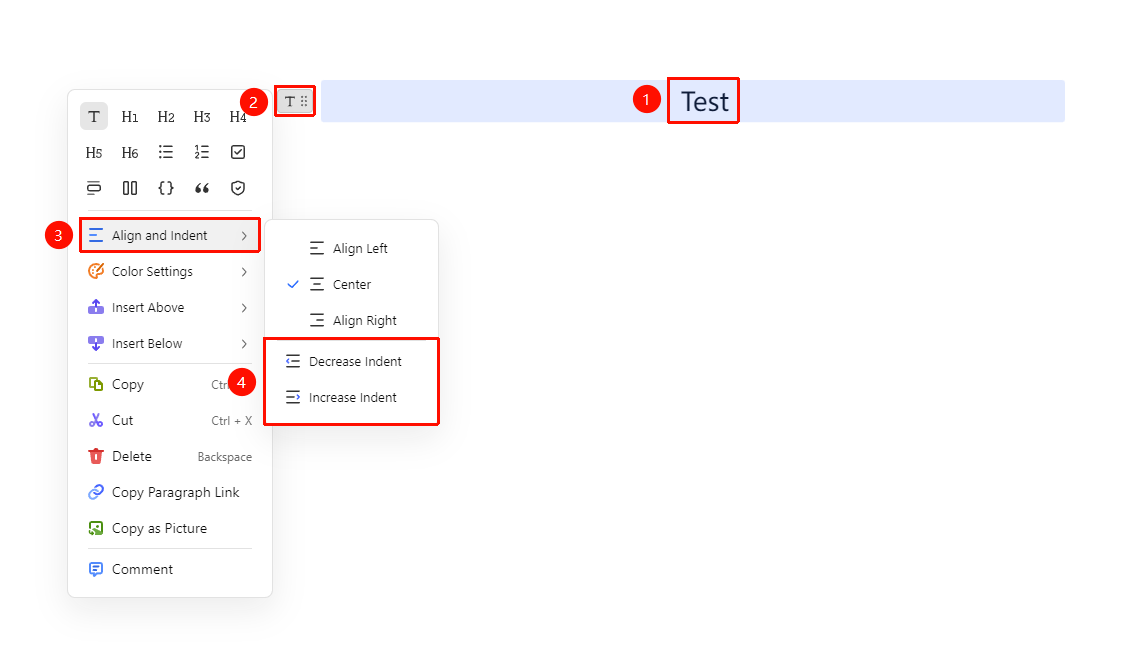
Select paragraph → "Paragraph Handle" icon → "Alignment & Indentation" button
- Place the cursor in the paragraph where you need to adjust indentation (or select multiple paragraphs of text)
- Click the Paragraph Handle icon on the left
- Click the "Alignment & Indentation" button
- Select the "Increase Indent" button or the "Decrease Indent" button
FAQ
Q1: Can AirPage set first-line indent or other indentation methods?
- Solution: AirPage currently only supports increasing or decreasing indentation and does not support setting more indentation methods.
Q2: How to make all paragraphs display with a uniform indentation standard?
- Solution: Select all paragraphs that need uniform indentation and set the indentation amount at once, so that all selected paragraphs apply the same indentation effect. You can also use the Format Painter to copy the indentation format from a paragraph that has already been set to other paragraphs.
Q3: No effect is displayed after setting indentation?
- Solution: Paragraph indentation in AirPage is a block-level content effect. If the paragraph is in a special format such as a heading or list, some indentation settings may be overridden by the default styles of headings/lists. It is recommended to set the indentation first, and then adjust the heading level.
Notes
- Indentation values are usually measured in characters or pixels and can be flexibly adjusted based on visual effect
- The Format Painter supports copying paragraph indentation formatting to other paragraphs