Feature Summary
When you need to migrate document content in Markdown format into AirPage, the Import Markdown feature supports importing local .md files through various methods such as slash commands, the top menu, or drag-and-drop. The content is automatically parsed and imported into AirPage, preserving formats like headings, lists, and code blocks, allowing you to quickly complete content migration and online collaboration.
Feature Description
| Feature Dimension | Description |
|---|---|
| Membership Restriction | No membership restriction |
| Version Restriction | No version restriction (only supported on PC/Web; slash commands are temporarily unsupported on mobile) |
Steps
Import via Top Import Menu
Feature Entry
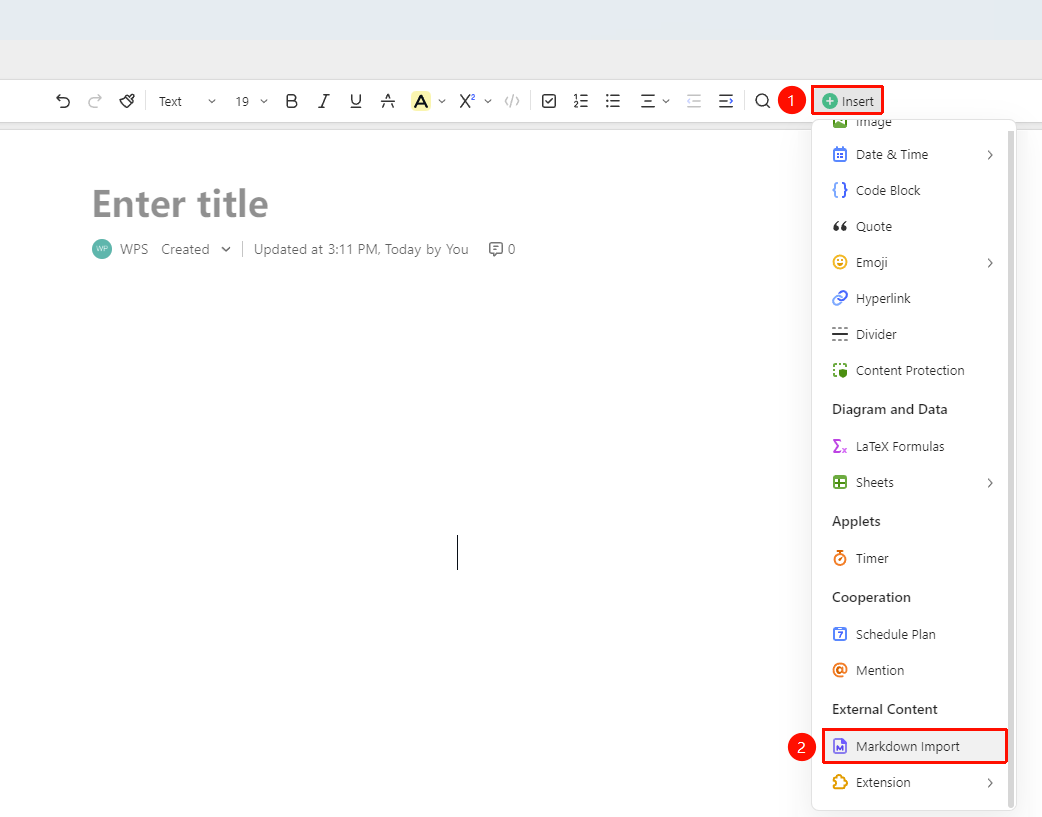
Top ribbon → 「Insert」 drop-down menu → 「Markdown Import」 button → 「Select Local File」
- Create a new or open an existing target AirPage
- Click the 「Insert」 drop-down menu in the top ribbon
- Select 「Markdown Import」 from the expanded menu
- In the pop-up file picker, find and select a local .md file
- Click 「Open」 to confirm the import; the content will be automatically parsed and written into the document while preserving the original formatting
Quick Import via Drag-and-Drop
Feature Entry
Local folder → Drag the 「.md format file」 to the document editing area
- Open the AirPage editing interface
- Select the .md file from the local file system
- Directly drag the file into the document editing area
- After releasing the mouse, WPS will automatically parse the Markdown content and import it into the current document
FAQ
Q1: After importing Markdown, LaTeX formulas are displayed as source code and cannot be rendered?
- Solution: Currently, AirPage's Markdown import does not support LaTeX formulas yet. After import, formula content will be displayed as source text. If you need to display formulas in the document, it is recommended to manually re-insert them after import via 「Insert」 → 「Formula」, or use AirPage's built-in slash commands
/gsor/equationto insert LaTeX formulas.
Q2: What should I do if some formatting displays incorrectly after import?
- Solution: AirPage's Markdown import will try its best to preserve the original file's major formatting, such as heading levels, lists, code blocks, and blockquotes. If some formatting is not converted correctly, you can manually adjust it after import. It is recommended to check the syntax of the .md file for correctness before importing.
Q3: Can I append and import a Markdown file into a document that already has content?
- Solution: Yes. Position the cursor at the location in the document where you want to insert the Markdown content, then execute the import operation via the insert menu. The Markdown content will be inserted at the current cursor position without overwriting existing content.
Notes
- The imported file must be a Markdown file in
.mdformat - Slash command import is temporarily unsupported on mobile; it is recommended to use a PC
- After import, it is recommended to check the document formatting and manually adjust any parts that were not converted correctly