Feature Summary
AirPage supports the paragraph link feature, allowing you to create intra-document jumps to quickly navigate to a specific paragraph, improving document reading efficiency.
Feature Description
| Feature Dimension | Description |
|---|---|
| Membership Restriction | No membership restriction |
| Version Restriction | No version restriction |
Steps
Create a Paragraph Link
Feature Entry
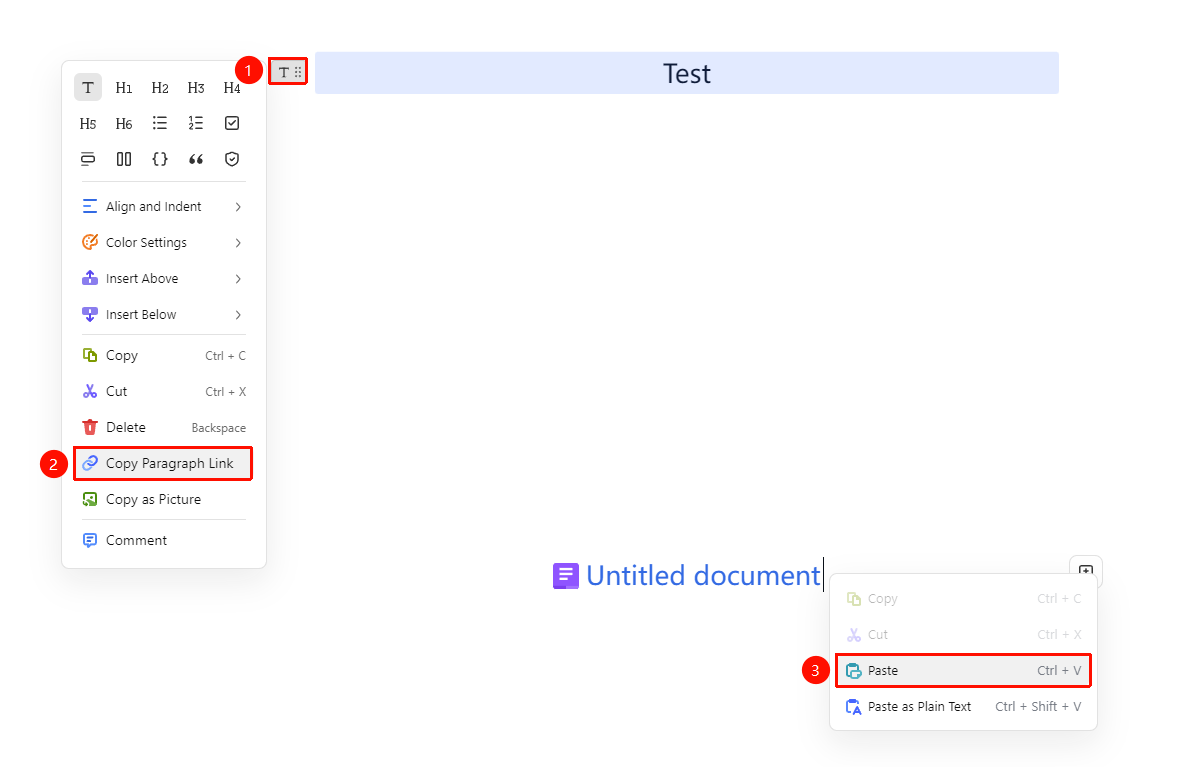
「Hover over paragraph」→「⋮⋮ Toolbar」→「Copy paragraph link」
- Hover the mouse over the paragraph you want to create a link for
- The ⋮⋮ toolbar appears
- Click ⋮⋮, and select 「Copy paragraph link」 from the menu
- Paste the link at the location where you want to jump from
Use a Paragraph Link
Feature Entry
「Click link」→「Auto jump」
- Click the paragraph link in the Document
- The page automatically scrolls to the target paragraph
- The target paragraph will be highlighted
FAQ
Q1: Can paragraph links jump to other Documents?
- Solution: Paragraph links only support intra-document jumps. If you need to jump across Documents, please use the hyperlink feature.
Q2: Will deleting a paragraph affect the created link?
- Solution: If the linked paragraph is deleted, the link will become invalid and needs to be recreated.
Notes
- Paragraph links are only valid within the current Document
- Suitable for table of contents jumps in long Documents
- Links will automatically update as the Document content changes