Feature Summary
The row height feature allows you to adjust the height of each row in a data sheet, enabling full display of cell content or optimizing visual layout.
Feature Description
| Feature Dimension | Description |
|---|---|
| Membership Restriction | No membership restriction |
| Version Restriction | No version restriction |
Operation Steps
Adjust Row Height
Feature Entry
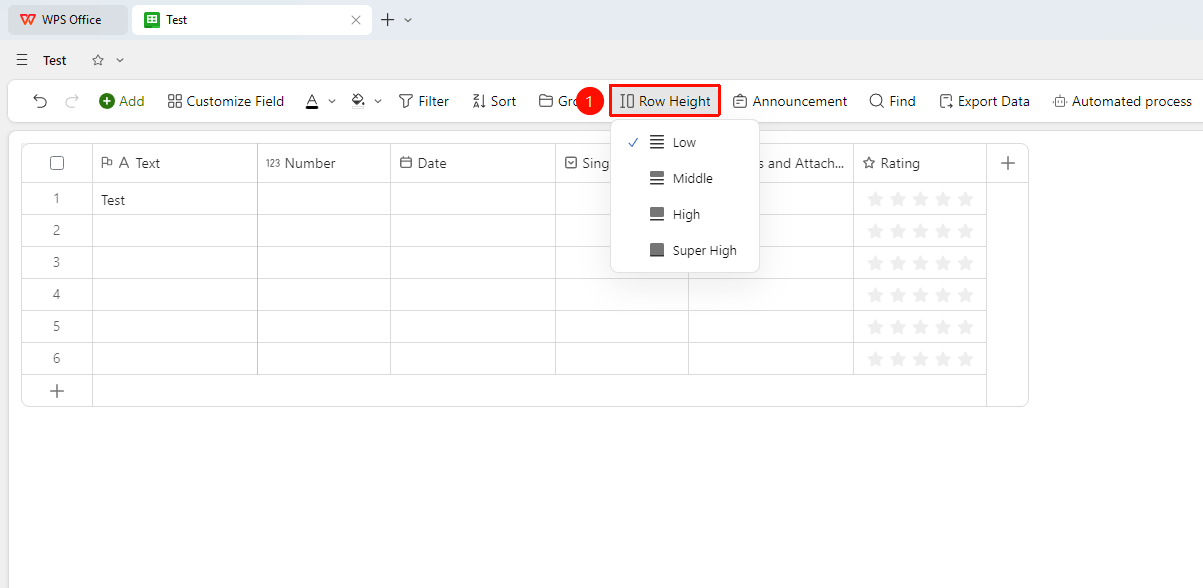
「Toolbar」→「Row Height」button
- Click the top toolbar
- Click the 「Row Height」 button
- Select the height type:
- Low
- Medium
- High
- Extra High
FAQ
Q1: Does the data sheet support custom row height values?
- Solution: Currently, the data sheet does not support custom row height values. You can only select from the preset row height options.
Notes
- Row height adjustment only affects the display of the current view and does not affect the data content.
- Excessively small row heights may cause incomplete content display, affecting data review efficiency.