Feature Summary
The Save As and Export feature allows you to save an AirSheet as a new file copy, or export it to various formats such as Excel, CSV, PDF, and images, facilitating offline viewing and data exchange.
Feature Description
| Feature Dimension | Description |
|---|---|
| Membership Restriction | No membership restriction |
| Version Restriction | No version restriction |
Operation Steps
Save AirSheet As
Feature Entry
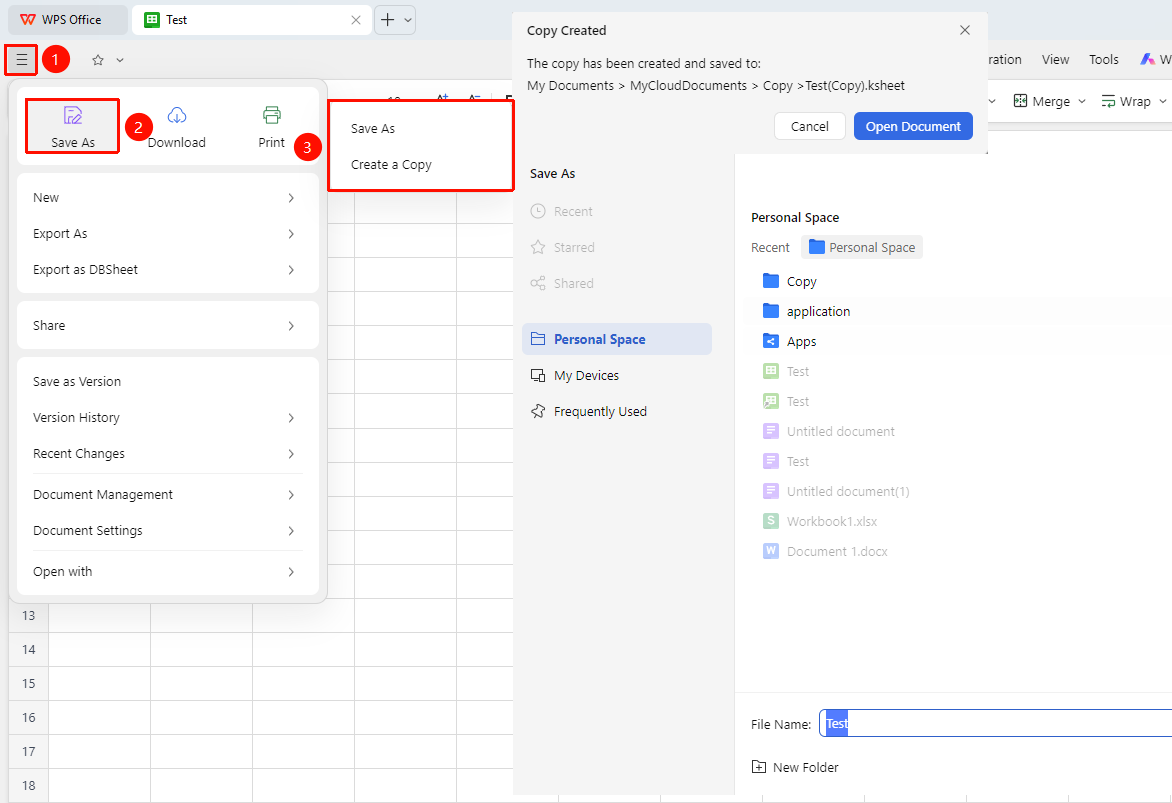
File Operations (☰) icon → "Save As"
- Click the File Operations (☰) icon in the upper left corner
- Select "Save As" from the menu
- Choose the save operation: "Save As" / "Create a Copy"
- Select the save path
- Click "Save and Open" to complete the save
Export to Other Formats
Feature Entry
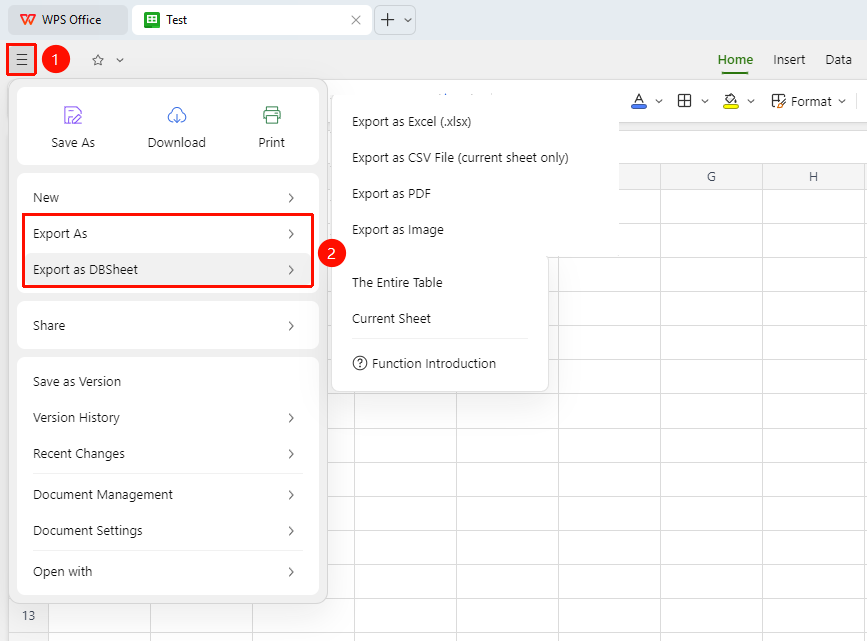
File Operations (☰) icon → "Export As" / "Export as DBSheet"
- Click the File Operations (☰) icon in the upper left corner
- Select "Export" from the menu
- Select the export format:
- Export as PDF: Suitable for sharing or printing
- Export as CSV: Suitable for importing into other databases
- Export as Excel: Suitable for sharing with non-WPS users
- Export as Image: Suitable for sharing with users who do not need to edit
- Export as DBSheet: You can choose to export the entire sheet or the current worksheet as a DBSheet
FAQ
Q1: Can the exported file retain the original formatting?
- Solution: Exporting to the corresponding format (e.g., xlsx) can fully retain all formatting, formulas, and styles. Exporting to other formats (e.g., DBSheet) may require some formulas to be reconfigured; it is recommended to verify formula settings after export.
Q2: Is an internet connection required for export?
- Solution: Yes. Since AirSheets data is stored in the Cloud, the export operation requires a network connection to obtain the latest data. Ensure the network is functioning properly before performing the export operation.
Q3: Are formulas retained after exporting to PDF?
- Solution: No. PDF export captures the calculated results of formulas (static values) and does not retain the formulas themselves. If you need to retain formulas, please export to the xlsx format.
Notes
- When exporting to CSV format, formulas are not included; only displayed values are retained
- Exporting large files may take a long time; please be patient
- Exporting generates a copy and will not affect the Cloud collaboration file
- The "Efficiency " Tab at the top of the page allows you to choose to export to PDF, images, and DBSheet