AirSheet supports inserting Column charts to visually display data size comparisons and trend changes.
Feature Description
| Feature Dimension | Description |
|---|---|
| Membership Restriction | No membership restriction |
| Version Restriction | No version restriction |
Operation Steps
Insert Bar Chart
Feature Entry
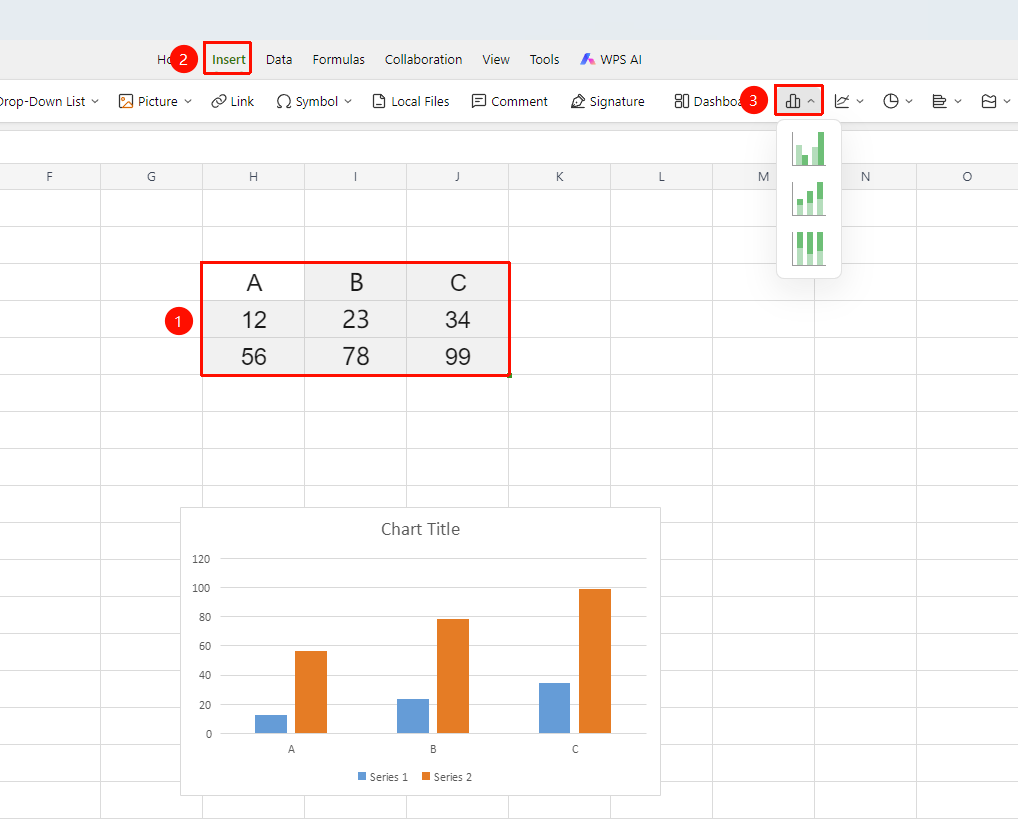
「Insert」 tab → 「Chart」 → 「Column Chart」
- Select the cell range containing data (ensure category headers and values are included)
- Click the 「Insert」 tab, select 「Column Chart」
- Then select a specific subtype (Clustered Column Chart, Stacked Column Chart, etc.)
- The bar chart will be automatically generated and can be dragged to adjust its position and size
FAQ
Q1: Column chart data points are misaligned and labels are disordered?
- Solution: The data source contains empty rows/columns or merged cells causing interference. Delete empty rows/columns, unmerge header rows, and then reselect the range to insert the chart again.
Notes
- The data source should contain continuous header rows and values; avoid empty rows and columns
- Right-click the chart → 「Edit Chart」 to edit chart elements and chart data
- You can also quickly insert a Column chart by click「Chart」button from the「Home」tab