Feature Summary
The Duplicates feature allows users to quickly highlight or remove duplicate values in data columns. It supports judgment by single or multiple column combinations and is suitable for data cleaning and deduplication scenarios.
Feature Description
| Feature Dimension | Description |
|---|---|
| Membership Restriction | No membership restriction |
| Version Restriction | No version restriction |
Steps
Highlight Duplicates
Feature Entry
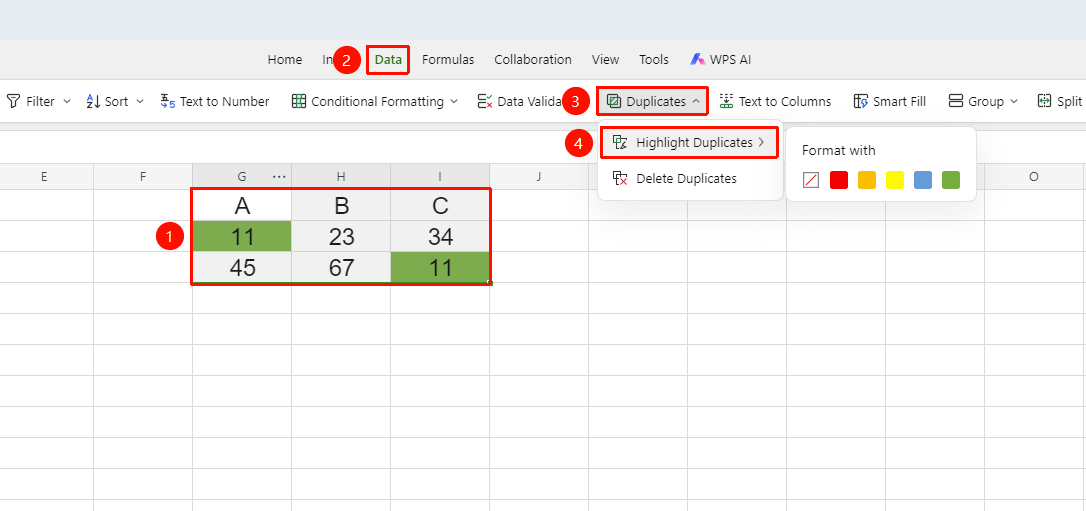
"Data" tab → "Duplicates" button → "Highlight Duplicates"
- Select the cell range to check for duplicates
- Click the Duplicates button in the Data tab
- Select Highlight Duplicates
- Specify a color in the pop-up dialog
- Cells containing duplicate data will be filled with the selected color
Remove Duplicates
Feature Entry
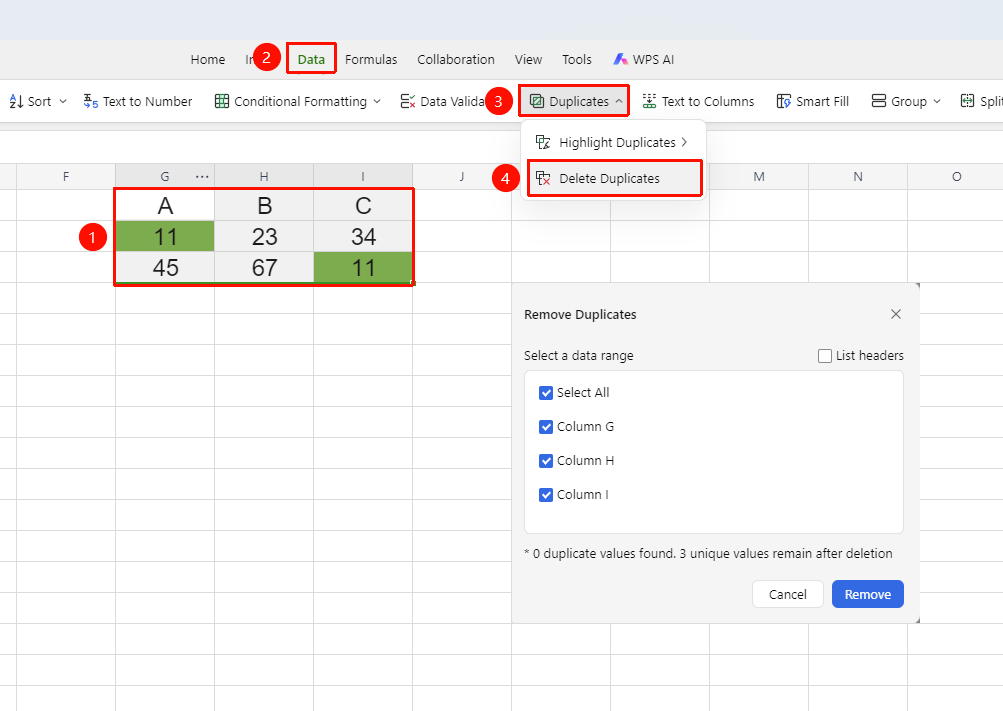
"Data" tab → "Duplicates" button → "Remove Duplicates"
- Select the data range containing duplicate data (including headers)
- Click Duplicates → Remove Duplicates
- In the pop-up dialog, select the columns to use for duplicate judgment
- Click OK. The system will keep the first unique record and delete subsequent duplicate rows
- A pop-up will show the number of duplicate records removed
FAQ
Q1: Can I undo after removing duplicates?
- Solution: Yes, you can immediately press Command+Z to undo the operation and restore data. However, it is recommended to back up your data before performing the removal, as subsequent operations will increase the number of undo steps.
Q2: How do I judge duplicates based on only some columns when removing duplicates?
- Solution: After opening the "Remove Duplicates" dialog, uncheck the columns that should not participate in the judgment, keeping only the key columns for duplicate checking. Click OK to remove duplicates based on the specified columns.
Q3: Does removing duplicates delete all duplicate rows?
- Solution: No, removing duplicates keeps the first occurrence of a data row and deletes subsequent duplicate rows.
Notes
- Duplicate detection is an exact match; content is considered duplicate only if it is completely identical.
- Removing duplicates/undoing duplicate removal may take some time if multiple cells are involved. Please wait patiently.