Feature Summary
Hide Zero and Error Values is a display optimization feature in AirSheet that makes sheets appear cleaner and clearer, suitable for sheets containing many formulas or missing data.
Feature Description
| Feature Dimension | Description |
|---|---|
| Membership Restriction | No membership restriction |
| Version Restriction | No version restriction |
Steps
Enable Hide Zero and Error Values
Feature Entry
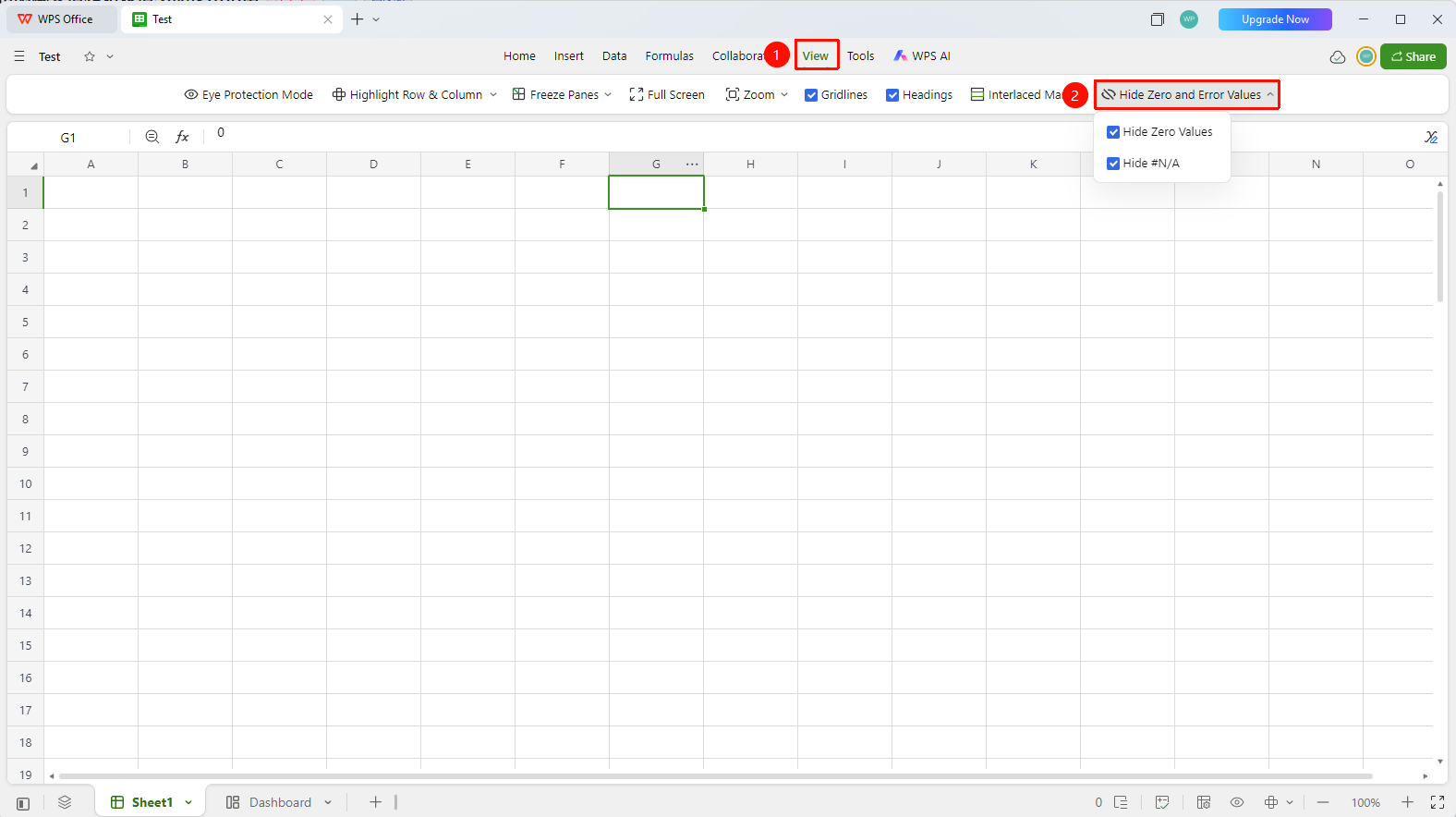
「View」 tab → 「Hide Zero and Error Values」
- Click the top 「View」 tab
- Find and click the 「Hide Zero and Error Values」 button in the toolbar
- A dropdown menu appears with two checkbox options:
- Hide Zero Values: When checked, all cells with a value of 0 in the sheet will not display content
- Hide #N/A: When checked, all cells displaying the #N/A error value in the sheet will not display content
- Check the corresponding options as needed; the sheet takes effect immediately. Uncheck to restore the display
FAQ
Q1: Does hiding zero and error values affect the actual data in cells?
- Solution: No. This feature only changes the display state of cells and does not modify the actual data or formulas in cells. The data still exists after hiding, and the original value can be seen in the formula bar.
Q2: After hiding zero values, will formulas referencing these cells be affected?
- Solution: No, they will not be affected. Hiding zero values is only a display-level concealment; the actual value of the cell is still 0, and the calculation results of formulas referencing these cells will not change.
Q3: Why are some #N/A error values not hidden?
- Solution: This feature only hides the #N/A error type. Other error value types (such as #REF!, #VALUE!, #DIV/0!, etc.) are not within the hiding scope. If you need to hide other error values, you can set up custom conditional formatting.
Q4: Are the hide settings saved with the file?
- Solution: Yes. The settings for hiding zero and error values are sheet-level display properties. After saving the file and reopening it, the previous hide state will be maintained.
Notes
- Hide Zero and Error Values is a sheet-level setting that applies to all cells in the current sheet
- Hiding only affects the display and does not affect the actual data and formula calculation results in cells
- This feature is a view auxiliary function, suitable for data presentation and reporting scenarios, to avoid large numbers of 0 values or error values interfering with readability in the sheet