Feature Summary
Reduce File Size is used to compress the file size of AirSheets. It reduces file size by cleaning up redundant data, optimizing images, and clearing caches, thereby improving opening and editing speed.
Feature Description
| Feature Dimension | Description |
|---|---|
| Membership Restriction | No membership restriction |
| Version Restriction | No version restriction |
Operation Steps
Launch Reduce File Size
Feature Entry
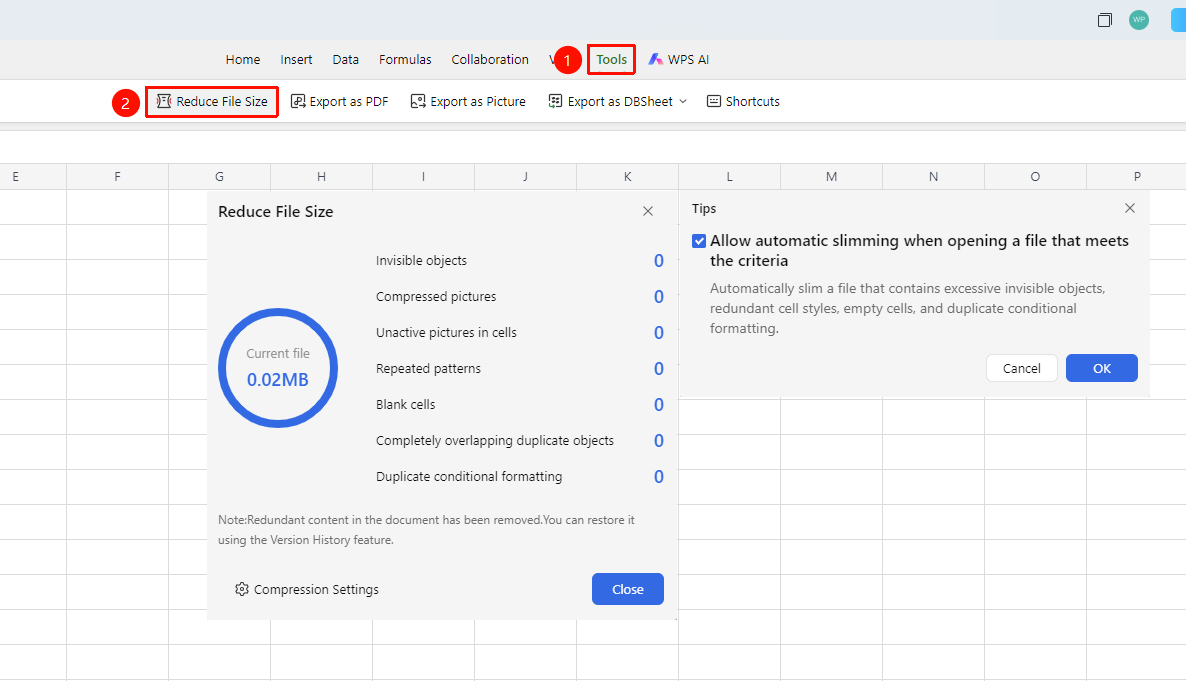
「Efficiency」 tab → 「Reduce File Size」
- Click the 「Efficiency Tab」
- Find and click 「Reduce File Size」
- It will automatically start Reduce File Size and display the current file size
- List optimized items: Compress Image, redundant data cleanup, style cleanup, etc.
- Click 「Reduction Settings」 to set 「Allow automatic file size reduction when the file meets the conditions upon opening」
FAQ
Q1: Will Reduce File Size affect the sheet data?
- Solution: Reduce File Size only cleans up redundant data and caches, and does not affect the actual sheet content. The optimized file content is exactly the same as before the reduction, only invalid data is cleaned up.
Q2: How long does Reduce File Size take?
- Solution: The reduction time depends on the file size. Small files usually complete within seconds, while large, complex files may take several minutes. The reduction process does not affect other collaborators' normal use of the sheet.
Q3: Is Reduce File Size effective for Cloud files in collaboration mode?
- Solution: Yes, it is effective. Reduce File Size will synchronously optimize the file size stored in the Cloud. After optimization, the opening speed for all collaborators will be improved.
Q4: How to recover if the Reduce File Size result is unsatisfactory?
- Solution: You can revert to the version before the reduction through the version history.
Q5: Can the reduction be performed repeatedly?
- Solution: Yes, each execution will analyze the current state and clean up optimizable content.
Q6: Under what circumstances should Reduce File Size be performed?
- Solution: It is recommended to perform the reduction when the file size is too large, loading is slow, or after frequent formatting edits.
Notes
- The reduction operation is irreversible; it is recommended to save an important backup first
- Compressing images will reduce image quality; a balance between clarity and file size needs to be weighed
- Regular execution can maintain good Document performance