Feature Summary
The Product question is used to display products and prices. Respondents can select the quantity of their preferred products, and the total price will be automatically calculated.
Feature Description
| Feature Dimension | Description |
|---|---|
| Membership Restriction | No membership restriction |
| Version Restriction | No version restriction |
Steps
Adding a Product Question
Feature Entry
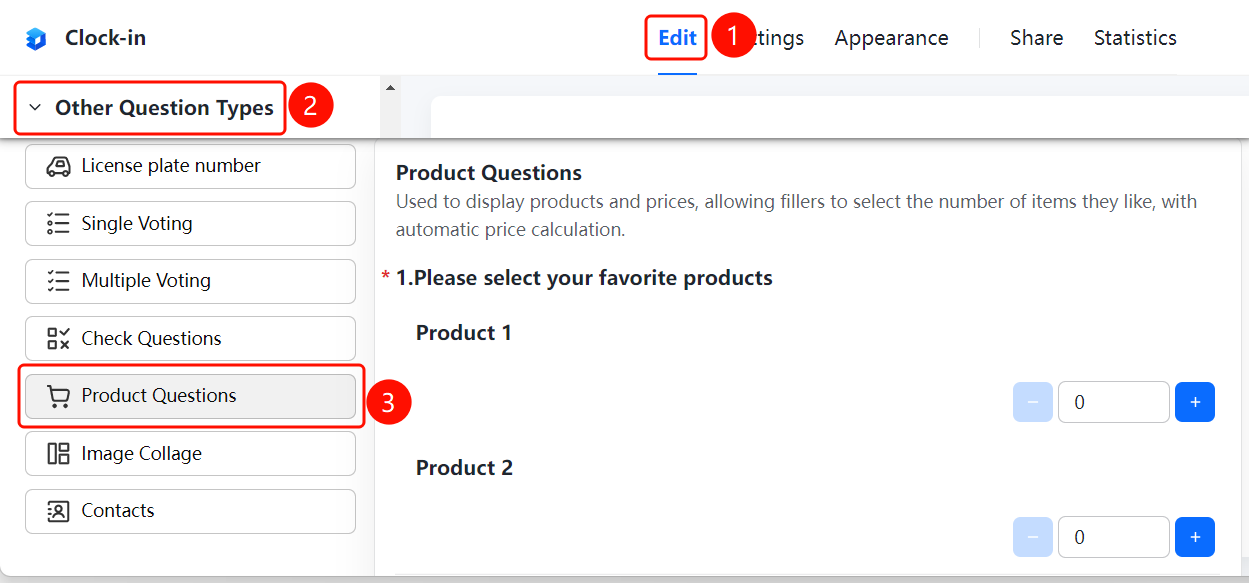
「Edit」 tab → 「Question Type」 → 「Other Question Types」 → 「Product Question」 button
- Click the top 「Edit」 tab
- In the left panel, expand the 「Question Type」 area
- Expand the 「Other Question Types」 area
- Click the 「Product Question」 button to add the Product question to the form
- Fill in the question title and description, and add products and prices
FAQ
Q1: What scenarios is the Product question suitable for?
- Solution: The Product question is suitable for scenarios where products and prices need to be displayed for respondents to select, such as product reservations, Group Form, etc.
Q2: Does the Product question automatically calculate the price?
- Solution: Yes, it does. After the respondent selects the quantity of products, the system will automatically calculate the total price.
Q3: How to add multiple products?
- Solution: Click the Product question, then click the 「Add Product」 button in the product area to add multiple products and set their prices.
Notes
- The Product question can display products and prices, and respondents can select the quantity of their preferred products
- The system will automatically calculate the total price of the selected products
- Supports adding multiple products and setting prices for each