Feature Summary
Multi-segment fill-in-the-blank is used to collect multiple pieces of content filled in by respondents. If there are multiple places in a paragraph that need to be filled in by others, you can use this question type.
Feature Description
| Feature Dimension | Description |
|---|---|
| Membership Restriction | No membership restriction |
| Version Restriction | No version restriction |
Operation Steps
Adding a Multi-Segment Fill-in-the-Blank Question
Feature Entry
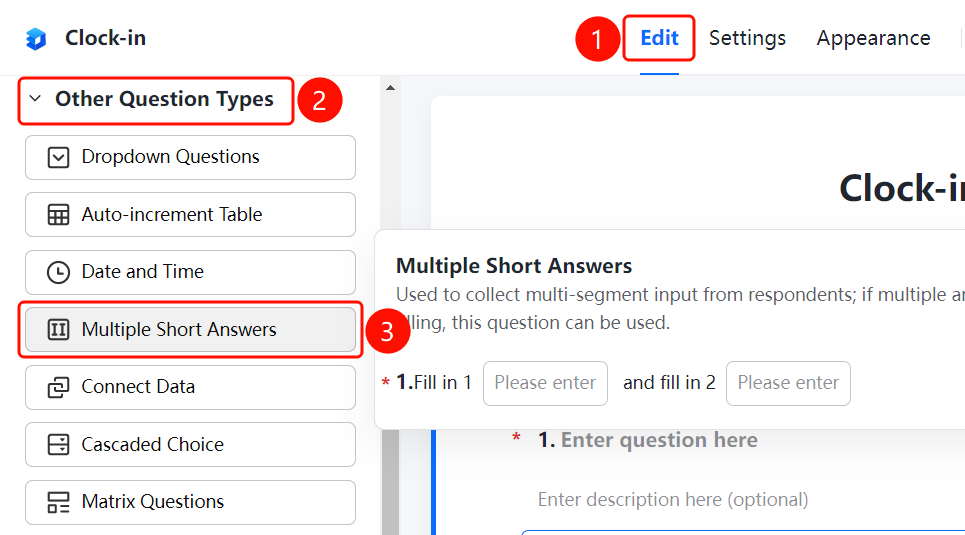
「Edit」tab → 「Question Type」 → 「Other Question Types」 → 「Multi-Segment Fill-in-the-Blank」 button
- Click the top 「Edit」 tab
- Expand the 「Question Type」 area in the left panel
- Expand the 「Other Question Types」 area
- Click the 「Multi-Segment Fill-in-the-Blank」 button to add the multi-segment fill-in-the-blank question to the form
- Fill in the question title and question description, and set multiple fill-in-the-blank segments
FAQ
Q1: What scenarios are multi-segment fill-in-the-blank questions suitable for?
- Solution: Multi-segment fill-in-the-blank is suitable for scenarios where there are multiple places in a paragraph that need to be filled in by others, such as a piece of text with multiple blanks to fill in.
Q2: How to add multiple fill-in-the-blank segments?
- Solution: Click the multi-segment fill-in-the-blank question, and click the 「Add Blank」 button in the fill-in area to add multiple fill-in-the-blank segments.
Q3: What is the difference between multi-segment fill-in-the-blank and fill-in-the-blank questions?
- Solution: A fill-in-the-blank question has a single input box, while multi-segment fill-in-the-blank allows you to set multiple blank positions within a paragraph, offering greater flexibility.
Notes
- Multi-segment fill-in-the-blank is suitable for scenarios where there are multiple places to fill in within a paragraph
- Supports adding multiple fill-in-the-blank segments
- Each fill-in-the-blank segment can have format restrictions set independently