Feature Summary
Student ID is a preset field in the check-in person information, used to collect the respondent's student ID information.
Feature Description
| Feature Dimension | Description |
|---|---|
| Membership Restriction | No membership restriction |
| Version Restriction | No version restriction |
Operation Steps
Adding Student ID
Feature Entry
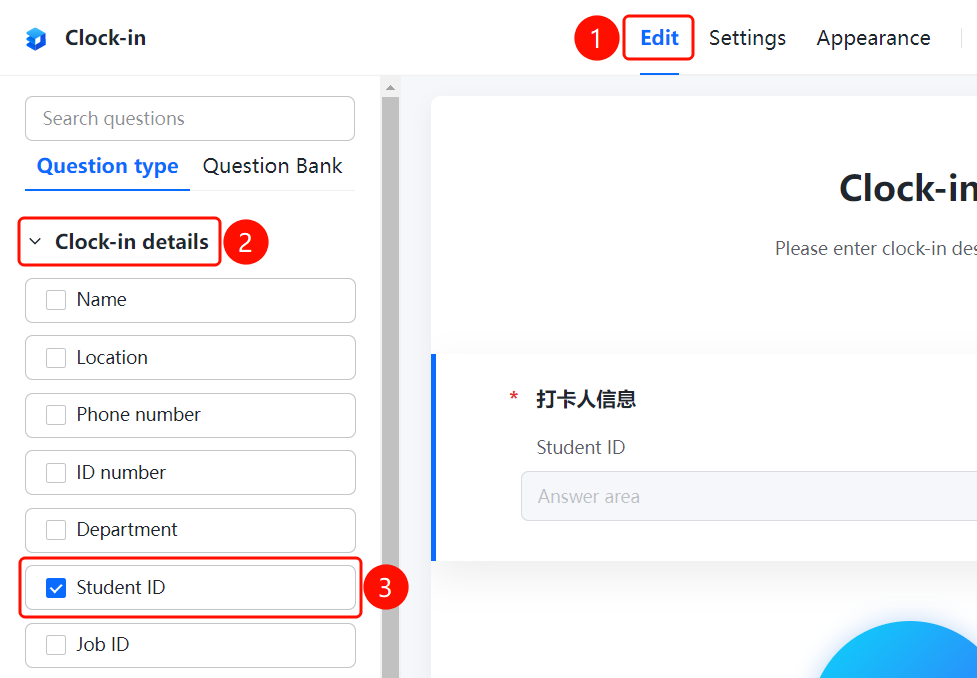
「Edit」tab → 「Check-in Person Info」 → 「Student ID」
- Click the top 「Edit」 tab
- Expand the 「Check-in Person Info」 section in the left panel
- Click the 「Student ID」 button to add the student ID to the form
- Respondents will fill in their student ID in the check-in person info area
FAQ
Q1: What scenarios is Student ID suitable for?
- Solution: Student ID is suitable for scenarios where the respondent's student ID needs to be collected, such as student check-in, homework collection, exam registration, etc.
Q2: What fields does Check-in Person Info include?
- Solution: Check-in Person Info includes preset fields such as Name, Phone Number, ID Number, Department, Student ID, and Employee ID, which can be added as needed.
Q3: Can Student ID be set as required?
- Solution: Yes. Click on Student ID, and in the 「Basic Settings」 panel, enable the 「This question is required」 toggle.
Notes
- Student ID is a preset field in Check-in Person Info, facilitating quick collection of respondent information
- Check-in Person Info also includes fields such as Name, Phone Number, ID Number, Department, and Employee ID
- You can control whether Student ID is required through Basic Settings