Feature Summary
The data statistics feature is used to view statistics for check-in forms, including metrics such as total check-in users, total check-in count, normal check-in count, and abnormal check-in count.
Feature Description
| Feature Dimension | Description |
|---|---|
| Membership Restriction | No membership restriction |
| Version Restriction | No version restriction |
Operation Steps
View Data Statistics
Feature Entry
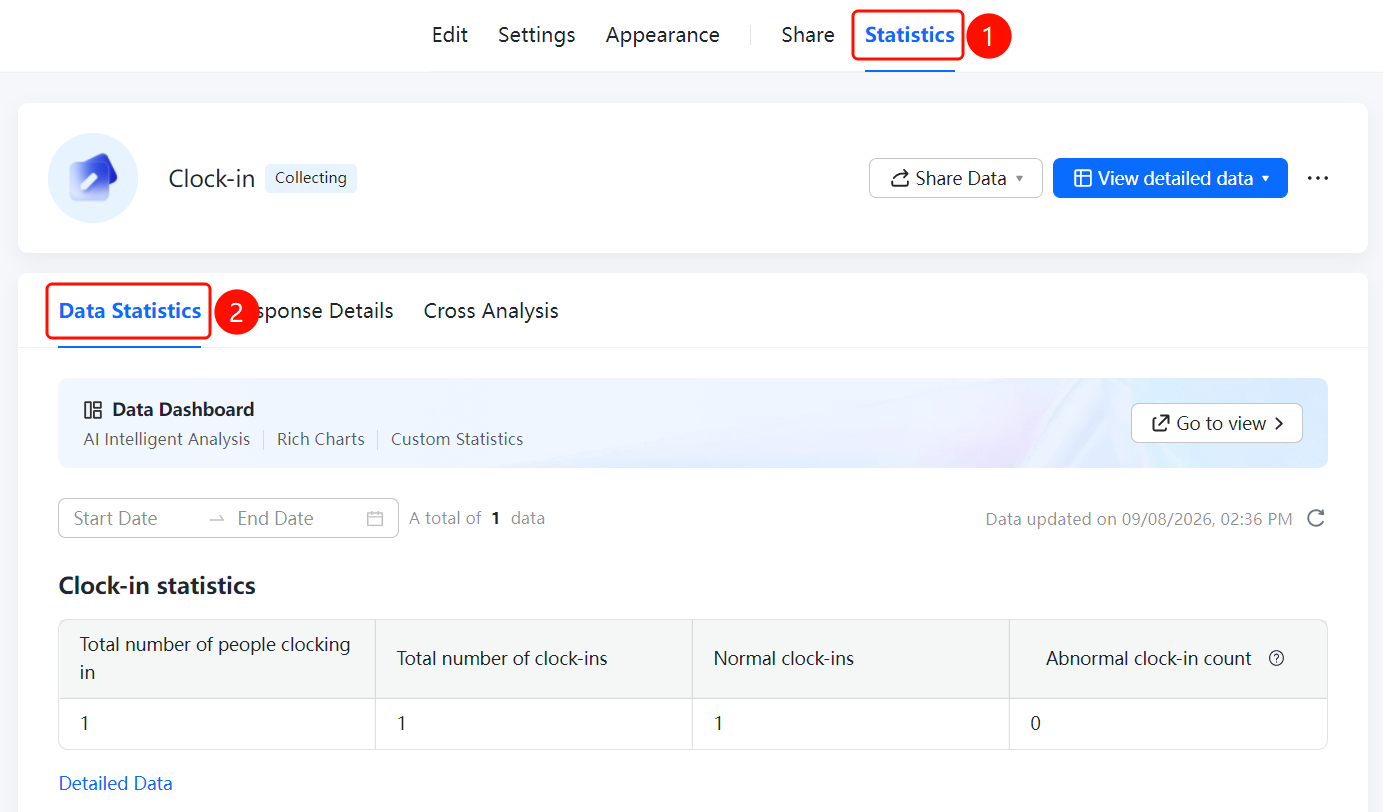
「Statistics」 tab → 「Data Statistics」
- Click the top 「Statistics」 tab
- Click 「Data Statistics」 in the menu below
- View check-in statistics: total check-in users, total check-in count, normal check-in count, abnormal check-in count
- You can filter the statistical range by 「Start Date」 and 「End Date」
FAQ
Q1: What metrics can be viewed in data statistics?
- Solution: Data statistics can view metrics such as total check-in users, total check-in count, normal check-in count, and abnormal check-in count.
Q2: How to view statistics by time period?
- Solution: Set the 「Start Date」 and 「End Date」 on the data statistics page to filter statistics for a specified time period.
Q3: What is the difference between data statistics and data dashboard?
- Solution: Data statistics displays core check-in metric data; the data dashboard provides richer chart displays and custom statistical features.
Notes
- Data statistics can view total check-in users, total check-in count, normal check-in count, and abnormal check-in count
- Supports filtering the statistical range by start date and end date
- You can view detailed data via 「View Detailed Data」