Feature Summary
Paragraph Description is mainly used to display explanatory information such as text, images, and hyperlinks in a form. It is not intended for respondents to fill in, and is suitable for scenarios such as form section descriptions and explanations.
Feature Description
| Feature Dimension | Description |
|---|---|
| Membership Restriction | No membership restriction |
| Version Restriction | No version restriction |
Operation Steps
Add Paragraph Description
Feature Entry
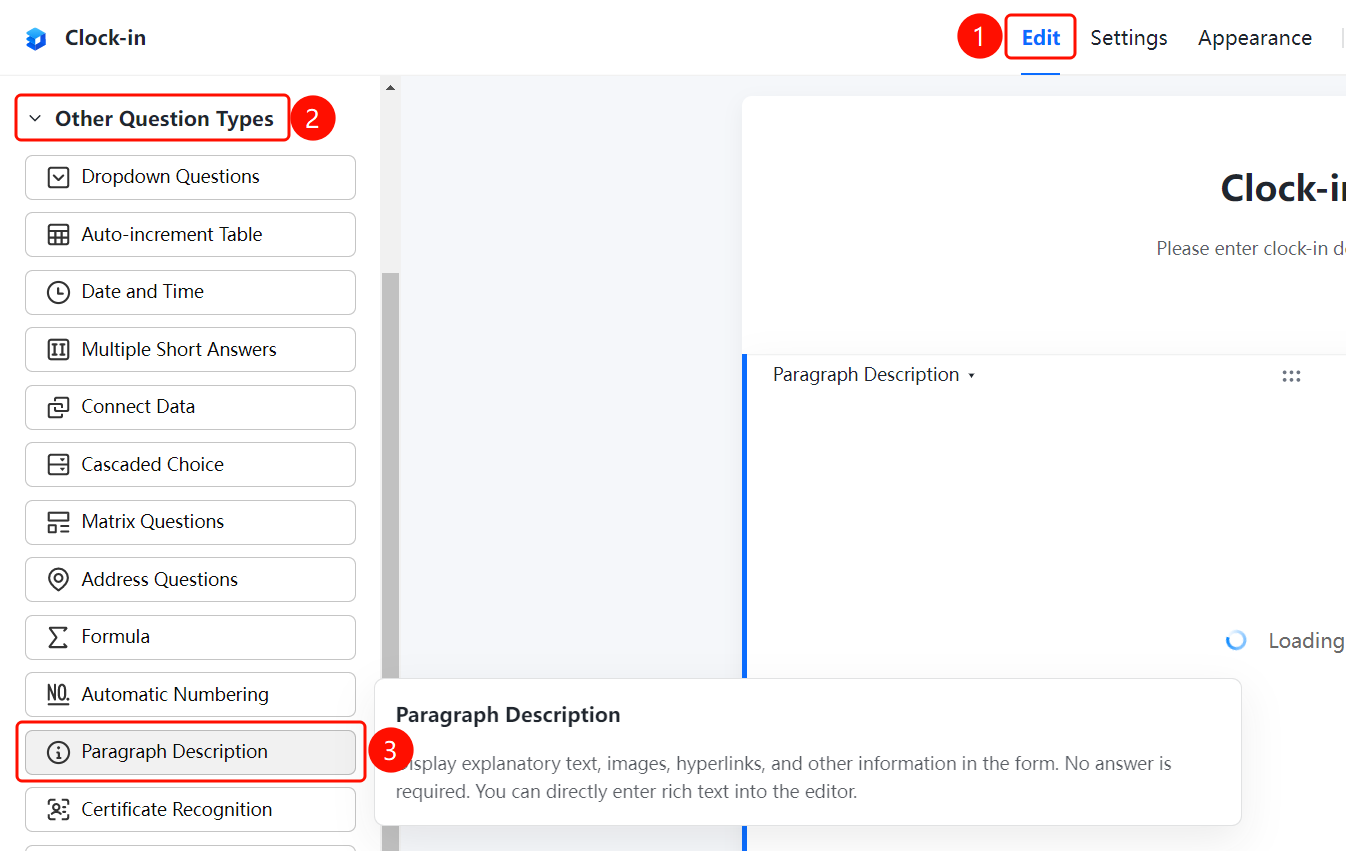
「Edit」 tab → 「Question Type」 → 「Other Question Types」 → 「Paragraph Description」 button
- Click the top 「Edit」 tab
- In the left panel, expand the 「Question Type」 area
- Expand the 「Other Question Types」 area
- Click the 「Paragraph Description」 button to add the paragraph description to the form
- In the 「Please enter paragraph description」 input box, enter rich text information such as explanatory text, images, and hyperlinks
FAQ
Q1: What scenarios is Paragraph Description suitable for?
- Solution: Paragraph Description is suitable for scenarios such as form section descriptions and explanations, used to display explanatory information such as text, images, and hyperlinks.
Q2: Does Paragraph Description require respondents to fill in?
- Solution: No. Paragraph Description is not intended for respondents to fill in; it is only used to display explanatory content.
Q3: Does Paragraph Description support rich text editing?
- Solution: Yes. You can directly enter rich text information in the editor, including text, images, hyperlinks, etc.
Notes
- Paragraph Description is not intended for respondents to fill in; it is only used to display explanatory content
- Supports entering rich text information such as text, images, and hyperlinks
- Suitable for scenarios such as form section descriptions and explanations