Feature Summary
The Matrix question packages several questions as sub-questions into one large question, offering a more polished appearance. It is commonly used for scenarios such as personal information forms and exam question groups.
Feature Description
| Feature Dimension | Description |
|---|---|
| Membership Restriction | No membership restriction |
| Version Restriction | No version restriction |
Steps
Adding a Matrix Question
Feature Entry
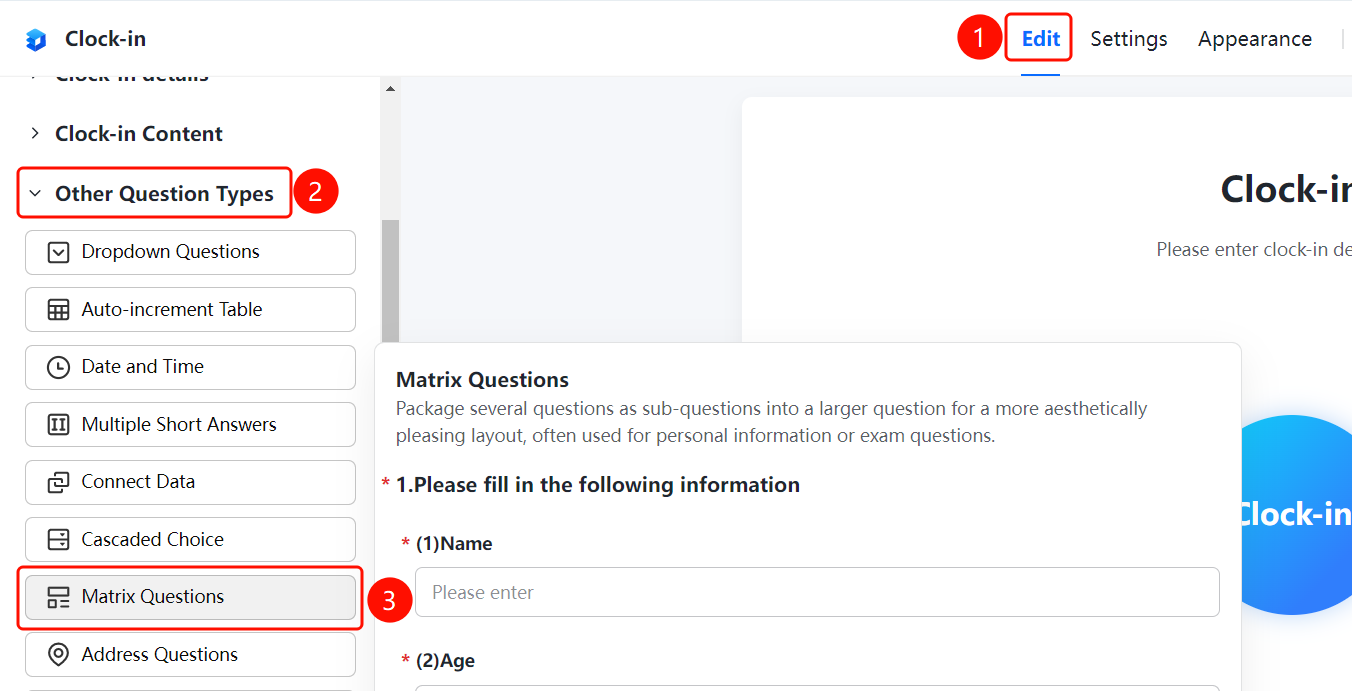
「Edit」 tab → 「Question Type」 → 「Other Question Types」 → 「Matrix Question」 button
- Click the top 「Edit」 tab
- Expand the 「Question Type」 area in the left panel
- Expand the 「Other Question Types」 area
- Click the 「Matrix Question」 button to add a matrix question to the form
- Add sub-questions within the matrix question, such as name, age, etc.
FAQ
Q1: What scenarios are matrix questions suitable for?
- Solution: Matrix questions are suitable for scenarios where several questions are packaged as sub-questions into one large question, commonly used for personal information forms, exam question groups, etc.
Q2: How to add sub-questions in a matrix question?
- Solution: Click on the matrix question, then click the 「Add Sub-question」 button in the sub-question area to add multiple sub-questions.
Q3: What is the difference between a matrix question and a regular question?
- Solution: A matrix question packages several sub-questions into one large question, offering a more polished appearance and facilitating unified management and display.
Notes
- A matrix question packages several questions as sub-questions into one large question
- Commonly used for scenarios such as personal information forms and exam question groups
- Supports adding multiple sub-questions