Feature Summary
The Department field is used to collect the department information of the respondent, typically as part of the check-in person's information, to facilitate categorized statistics of the submitted data by department dimension.
Feature Description
| Feature Dimension | Description |
|---|---|
| Membership Restriction | No membership restriction |
| Version Restriction | No version restriction |
Steps
Filling in Department
Feature Entry
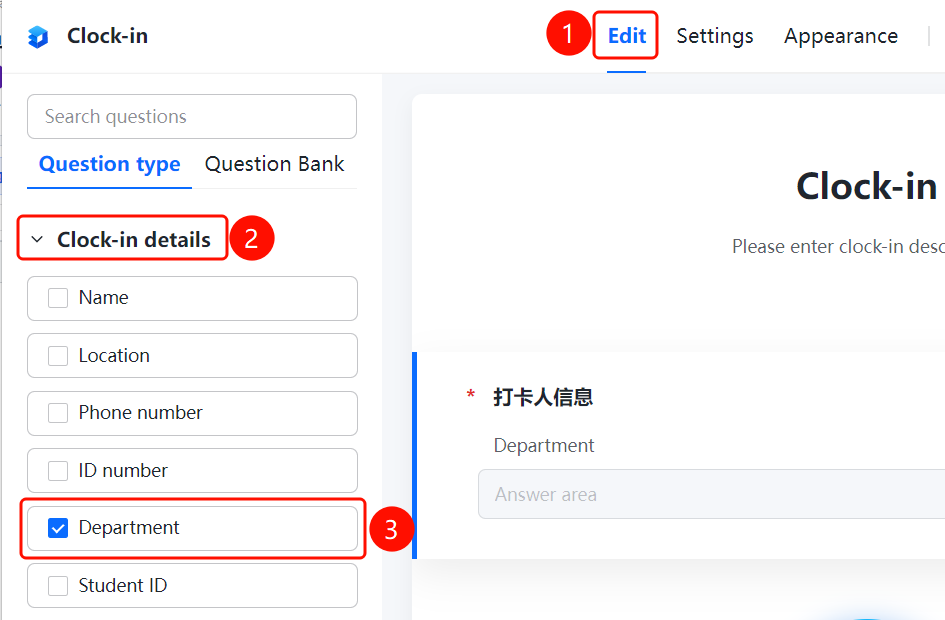
「Edit」 tab → 「Check-in Person Information」 → 「Department」 option
- Click the top 「Edit」 tab
- Expand the 「Check-in Person Information」 area in the left panel
- Check the 「Department」 option to add the department field to the form
- The respondent selects or enters their department in the answer area
FAQ
Q1: How to add the department field?
- Solution: Click the 「Edit」 tab, and check the 「Department」 option in the 「Check-in Person Information」 area to add the department field to the form.
Q2: Can the department field be set as required?
- Solution: Yes. After checking the department field, you can enable the required option in the field settings to require the respondent to fill in the department.
Q3: How to count submitted data by department?
- Solution: After collecting department information, you can perform categorized statistics on the submitted data by department dimension on the data statistics page.
Notes
- The department is typically used as part of the check-in person's information to identify the respondent's department
- Collecting department information facilitates data summary and analysis by department dimension