Feature Summary
The local shortcut creation feature allows you to generate a shortcut icon on your computer desktop for a Cloud DBSheet. Double-clicking the shortcut directly opens the corresponding DBSheet file, eliminating the tedious steps of manually opening the WPS client and then searching for the file each time.
Feature Description
| Feature Dimension | Description |
|---|---|
| Membership Restriction | No membership restriction |
| Version Restriction | No version restriction |
Operation Steps
Create a DBSheet Shortcut
Feature Entry
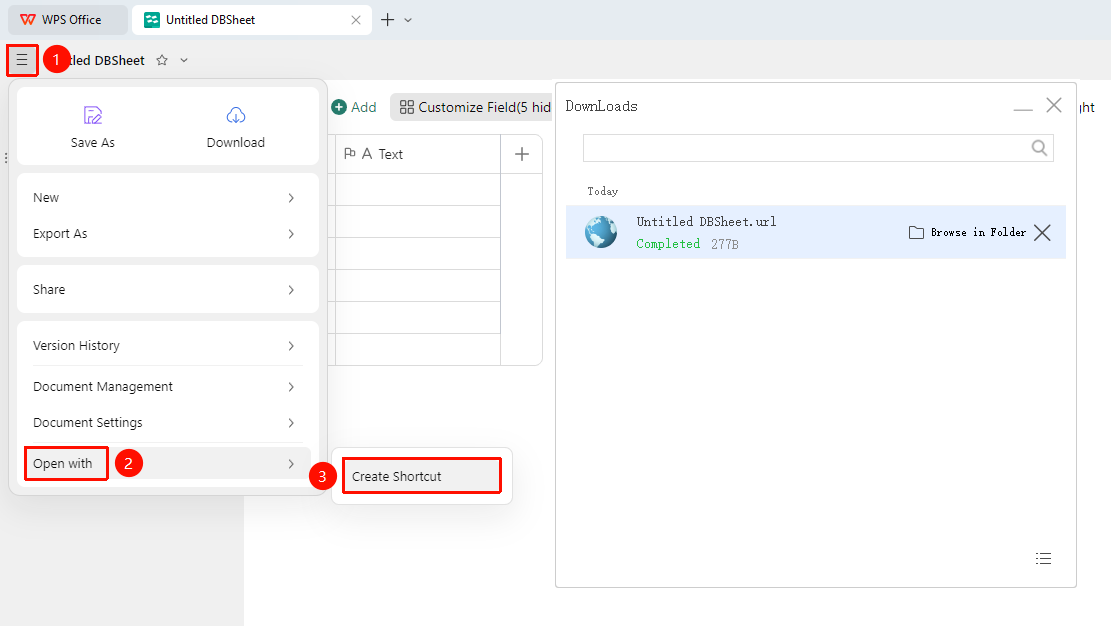
「File Operations」→「Open with」→「Create Shortcut」
- Open the target DBSheet in a browser or WPS client, click the 「File Operations」 tab (☰) icon in the upper left corner, and expand the drop-down menu
- In the drop-down menu, click 「Open with」 → 「Create Shortcut」 in sequence
- The system will generate and automatically download the shortcut to your local computer
- Click 「Open Folder」 to jump to the shortcut download location
- Click 「X」 to delete the generated shortcut
- A browser shortcut for the DBSheet will be generated on the desktop; double-click to open it
FAQ
Q1: Unable to open the DBSheet after double-clicking the shortcut
- Solution: Confirm that the current account has access permission to the DBSheet, and try switching to a different browser to open it.
Q2: A blank page is displayed after opening the shortcut
- Solution: This may be caused by network connection issues preventing the Cloud file from loading. Check if the network connection is normal.
Q3: Will re-enabling DBSheet collaboration affect the already generated shortcut?
- Solution: No, but you need to re-invite collaborators. Collaborators who do not have permission may not be able to join the DBSheet collaboration.
Precautions
- The local shortcut depends on a network connection and cannot open the Cloud DBSheet when offline
- If the DBSheet is deleted or permissions are revoked, the shortcut will become invalid
- The shortcut only points to the file location; deleting the shortcut will not affect the original DBSheet file