Feature Summary
The personal view switching feature allows users to quickly switch between personal and public views in DBSheet. Each user can have independent view configurations, enabling personalized data display without affecting other collaborators.
Feature Description
| Feature Dimension | Description |
|---|---|
| Membership Restriction | No membership restriction |
| Version Restriction | No version restriction |
Operation Steps
Switching Personal/Public Views
Feature Entry
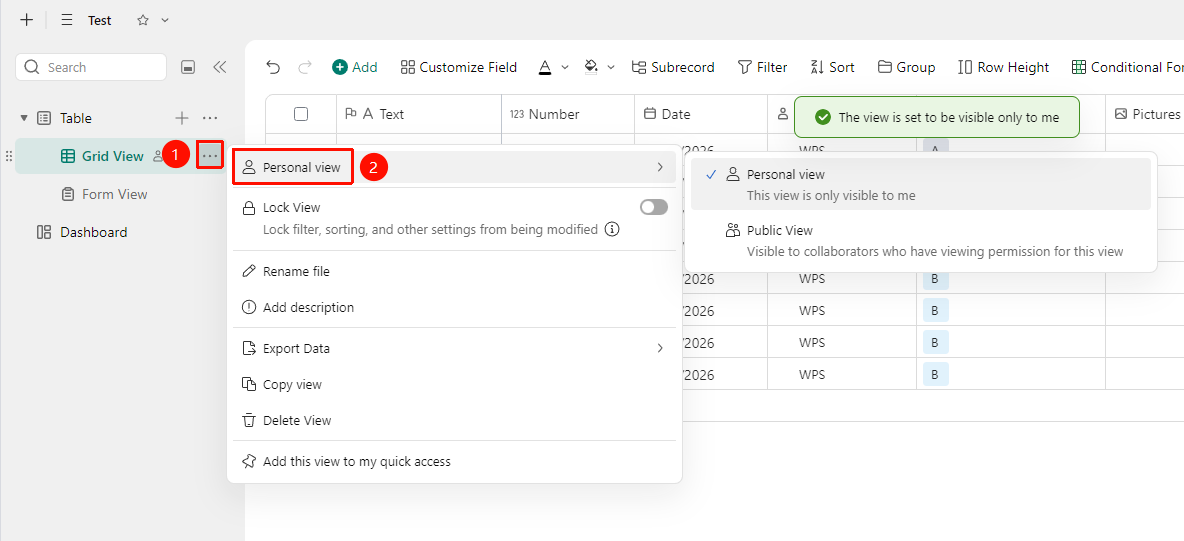
Left data sheet panel → "More Actions" → "Personal View/Public View"
- Open the target DBSheet, and locate the data sheet view you need to switch in the left data sheet panel of the interface.
- Click the "More Actions" button (... icon) on the right side of the view to expand the drop-down menu.
- In the pop-up menu, select to switch "Personal View/Public View".
- "Personal View" : This view is only visible to the operating user.
- "Public View" : This view is visible to collaborators with viewing permissions.
- Click any blank area within the DBSheet to apply the settings.
- After setting it as a personal view, a "person icon" will appear on the right side of the view, indicating that the view has been marked as a personal view and is only visible to the operating user.
FAQ
Q1: Cannot see the personal view I created
- Solution: Please confirm that the personal view was created under the current account. Personal views from other accounts cannot be seen after switching accounts. If the view has been deleted, it needs to be recreated.
Q2: Data does not change after switching views
- Solution: If no filter conditions are set for the personal view, the displayed data will be the same as the default view. You can add filter conditions in the view settings to make the view display a specific range of data.
Q3: Can I share a personal view with other collaborators?
- Solution: Personal views are only visible to the creator by default. If you need to share the view configuration, you can convert the personal view to a public view. After conversion, all collaborators with permissions can see the view.
Notes
- Modifications to a personal view only affect the creator and will not affect the view configurations of other collaborators.
- Personal views and public views share the same data source, so data modifications will be reflected synchronously in all views.