Feature Summary
The grouping feature automatically categorizes records in a data table by the value of a specific field, making it easy to quickly locate and compare data within the same category. Core capabilities include:
- Automatically group and display records by field value
- Support for multi-level nested grouping
- Perform statistical summaries within groups
- Collapse/expand each group with one click
Feature Description
| Feature Dimension | Description |
|---|---|
| Membership Restriction | No membership restriction |
| Version Restriction | No version restriction |
Operation Steps
Set Grouping Field
Feature Entry
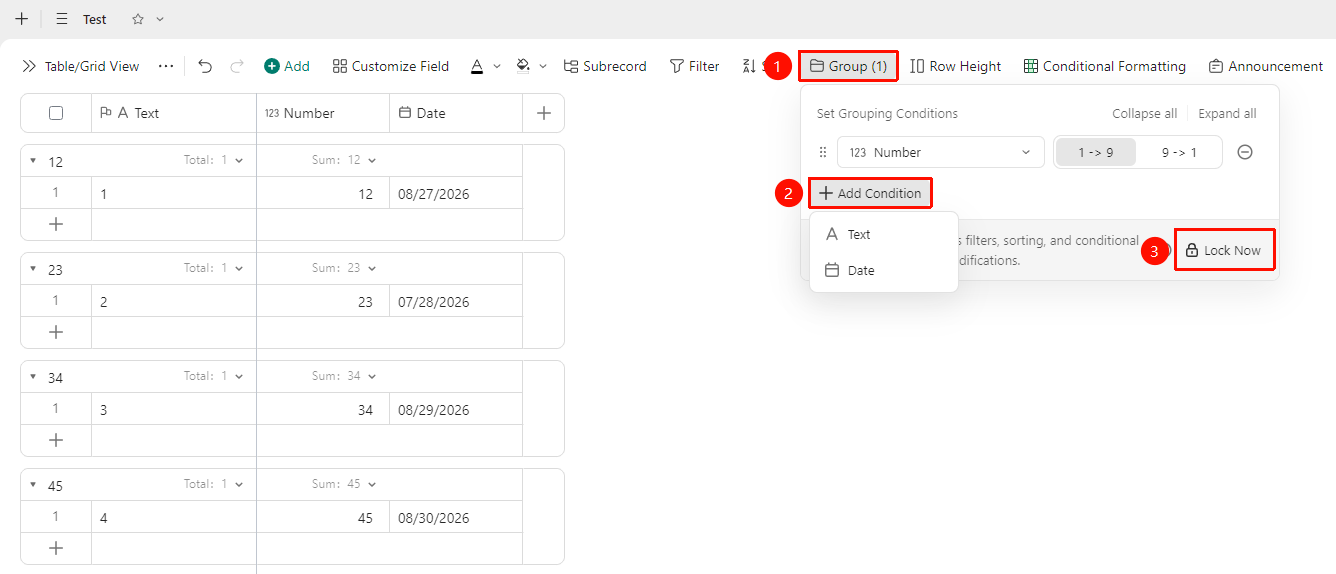
「Toolbar」→「Group」button→「Add Condition」→ Select field
- Open the target data table and click the Group button in the toolbar
- Click the Add Condition button
- Select the field by which to group and set the grouping conditions
- After confirming the selection, the system automatically categorizes data records into corresponding groups based on field values
- Click the Lock Now button to prevent other collaborators from modifying the view settings
FAQ
Q1: Records are not displayed after grouping, why?
- Solution: This may be because there are no matching records under that group, or the records have been filtered out by filter conditions. Please check whether the current data table has an active filter, and confirm that the field values of the records match the grouping conditions.
Q2: How to cancel data grouping?
- Solution: Click the Group button in the toolbar, delete the grouping conditions in the grouping panel, and the data will revert to a flat display state without grouping, with all records unaffected.
Q3: Can I group by multiple fields at the same time?
- Solution: Yes. Select multiple fields in sequence in Add Condition, and the system will perform multi-level nested grouping according to the field order, forming a clear hierarchical structure.
Notes
- Grouping only affects the data display mode and will not modify or delete any record content
- Grouping and filtering can be used simultaneously