Feature Summary
The parent record feature is used in multi-dimensional tables to display the parent record content of each row, making it easy to view the parent record information corresponding to a child record.
Feature Description
| Feature Dimension | Description |
|---|---|
| Membership Restriction | No membership restriction |
| Version Restriction | No version restriction |
Operation Steps
Create a Parent Record Field
Feature Entry
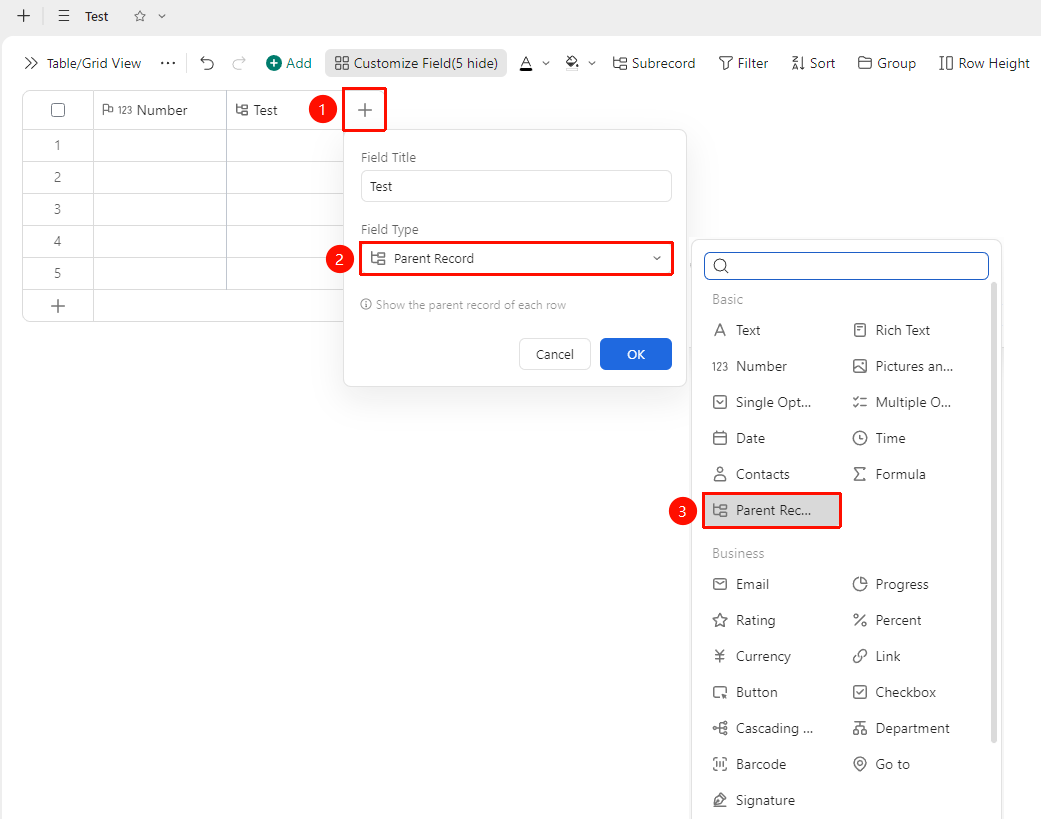
"+" button on the right side of the table header → "Parent Record" field
- Click the "+" button on the right side of the table header
- Select the "Parent Record" field from the pop-up field type list
- Enter the field name and click "Confirm" to complete the creation
- After completion, if the current record is a child record, its corresponding parent record content will be displayed in this field
FAQ
Q1: When deleting a parent record, will the child records be deleted together?
- Solution: No. When deleting a parent record, only the record you actually selected will be deleted. Unselected child records will be automatically promoted to independent records at the same level as the original parent record, and no data will be lost.
Q: Will restricted permissions at an intermediate level affect other levels?
- Solution: You can view records only if you have the corresponding permissions. Records without permissions are not allowed to be viewed.
Notes
- The parent-child hierarchy status of all table views and Gantt views within the same data table is globally synchronized