Feature Summary
The Created by field is used to automatically display the creator information for each row of records. All content is automatically filled by the system and does not support manual editing. It is suitable for scenarios such as record traceability, permission filtering, and responsibility attribution.
Feature Description
| Feature Dimension | Description |
|---|---|
| Membership Restrictions | No membership restrictions |
| Version Restrictions | No version restrictions |
Operation Steps
Create a New Created by Field
Feature Entry
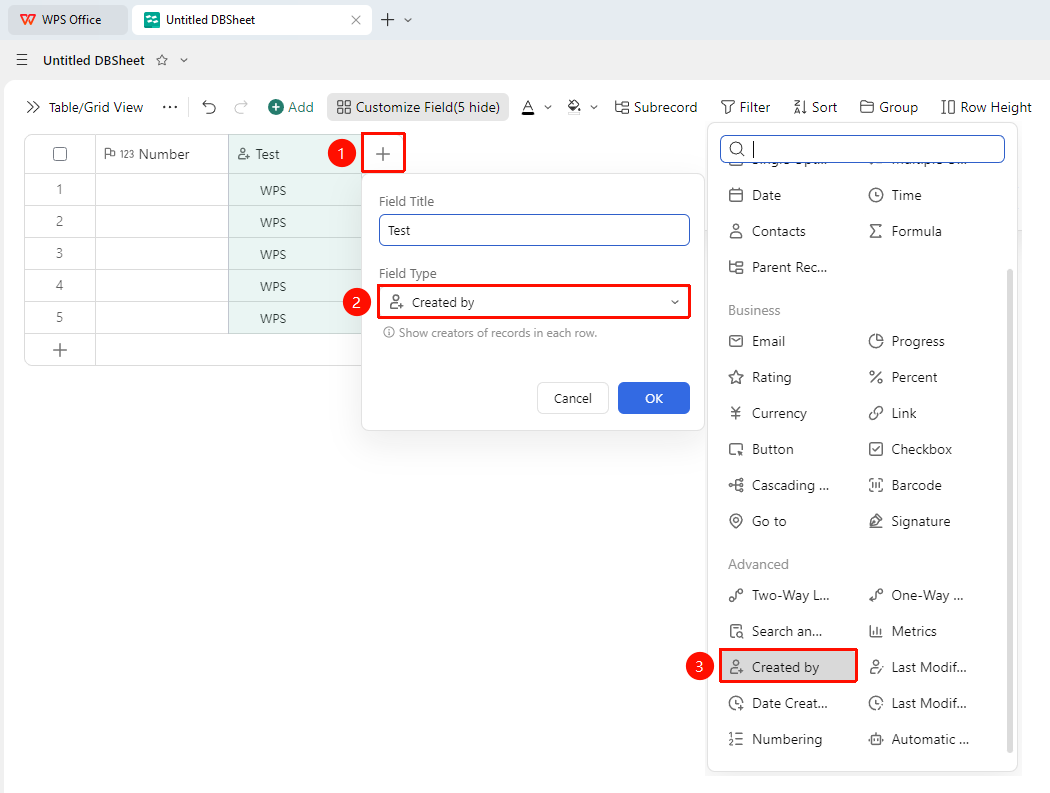
「+」 button on the right side of the table header → 「Field Type」 dropdown list → 「Created by」 option
- Click the 「+」 button on the right side of the table header
- Select the 「Created by」 field from the pop-up field type list
- Enter the field name and click 「OK」 to complete the creation
FAQ
Q1: Can the Creator field be manually modified?
- Solution: No. The Created by field is automatically recorded by the system and does not support manual editing. Even the Admin cannot modify the recorded creator information.
Notes
- Even if the Creator field is not added, creator information will still be retained in the system
- Can be used in conjunction with filtering and grouping features to tally workload by creator
- Extended information such as the creator's department and employee ID can be automatically retrieved via 「Get More Information」