Feature Summary
The license plate number question is used to collect candidates' license plate number information, supporting both gasoline and electric vehicles. Candidates can fill in their license plate number by typing or selecting.
Feature Description
| Feature Dimension | Description |
|---|---|
| Membership Restriction | No membership restriction |
| Version Restriction | No version restriction |
Operation Steps
Adding a License Plate Number Question
Feature Entry
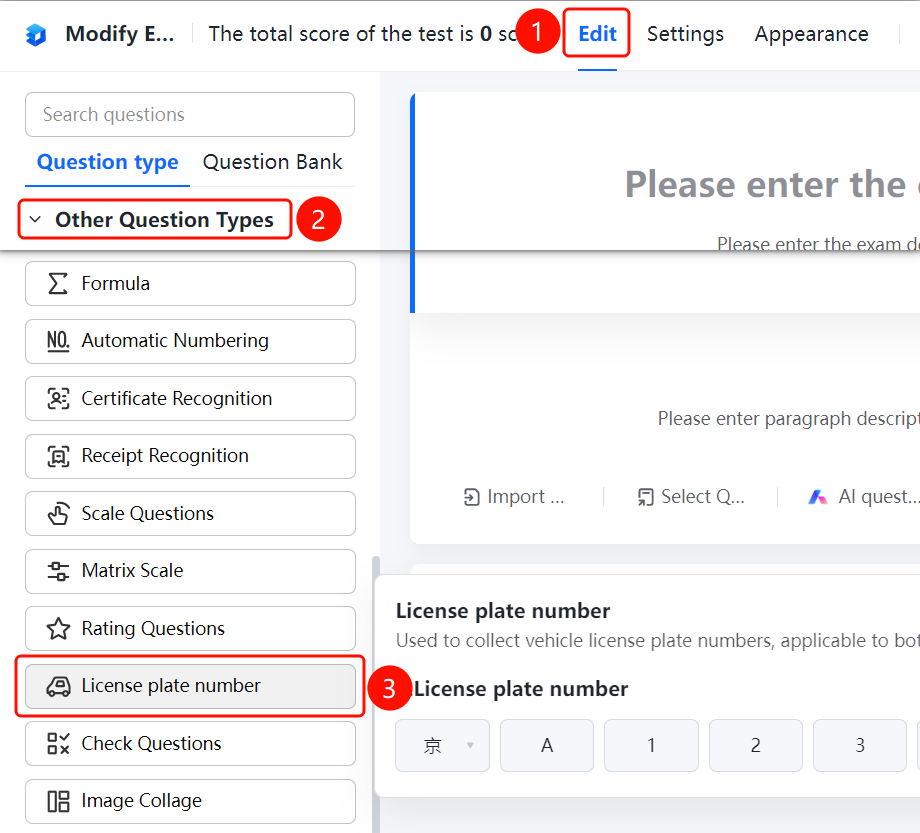
「Edit」tab → 「Other types of questions」 → 「License Plate Number」button
- Click the top 「Edit」 tab
- Expand the 「Other types of questions」 area in the left panel
- Click the 「License Plate Number」 button to add the license plate number question to the form
- Enter the question content in the question editing area, such as "License Plate Number"
FAQ
Q1: What types of license plates does the license plate number question support?
- Solution: The license plate number question is used to collect license plate number information, supporting both gasoline and electric vehicles.
Q2: How do candidates fill in their license plate number?
- Solution: Candidates can enter their license plate number in the license plate number input box, and the system will automatically recognize the license plate number format.
Q3: Can the license plate number question be set as required?
- Solution: Yes. Click on the license plate number question, and enable "This question is required" in "Basic Settings".
Notes
- The license plate number question is suitable for scenarios such as vehicle registration and parking management
- After the candidate enters the license plate number, the system will automatically validate the license plate number format