Feature Summary
Inserting major questions is used to divide different exam modules, such as distinguishing between single-choice and multiple-choice question types, or grouping questions with a shared stem. It supports extracting questions from the question bank and importing more questions.
Feature Description
| Feature Dimension | Description |
|---|---|
| Member Limitation | No member limitation |
| Version Limitation | No version limitation |
Operating Steps
Insert Major Questions
Feature Entry
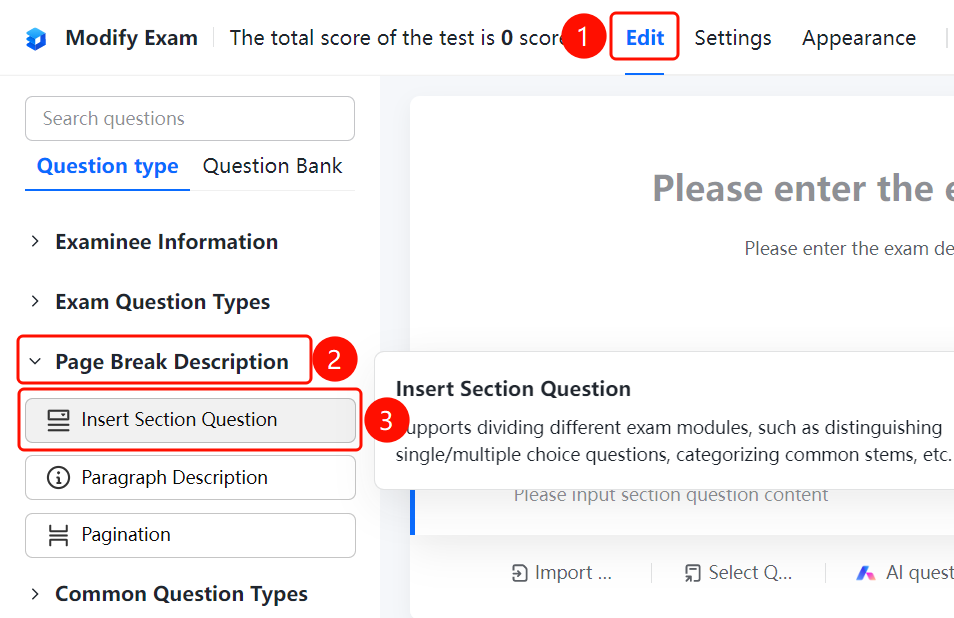
Edit tab > Page Description > Insert Major Question option
- Click the Edit tab at the top.
- Expand the Page Description area in the left panel.
- Click the Insert Major Question option to add the major question title to the exam.
- Enter the major question title in the Enter major question content input box.
- Click Extract from Question Bank or Import More Questions to add questions.
FAQ
Question 1: What is the use of inserting major questions?
- Solution: Inserting major questions is used to divide different exam modules, such as distinguishing between single-choice and multiple-choice question types, or grouping questions with a shared stem.
Question 2: How do I extract questions from the question bank?
- Solution: After clicking to insert a major question, click Extract from Question Bank, and select question types from the existing question bank to add to the exam.
Question 3: How do I import more questions?
- Solution: After clicking to insert a major question, click Import More Questions to import questions from other sources.
Notes
- Inserting major questions supports dividing different exam modules, making the exam structure clearer.