Feature Summary
Section description questions are primarily used to display explanatory text, images, hyperlinks, and other information in a form. They are not meant for respondents to answer and are suitable for scenarios such as section descriptions and explanations in forms. Rich text information can be entered directly in the editor.
Feature Description
| Feature Dimension | Description |
|---|---|
| Member Restrictions | No member restrictions |
| Version Restrictions | No version restrictions |
Operation Steps
Add a Section Description
Feature Entry
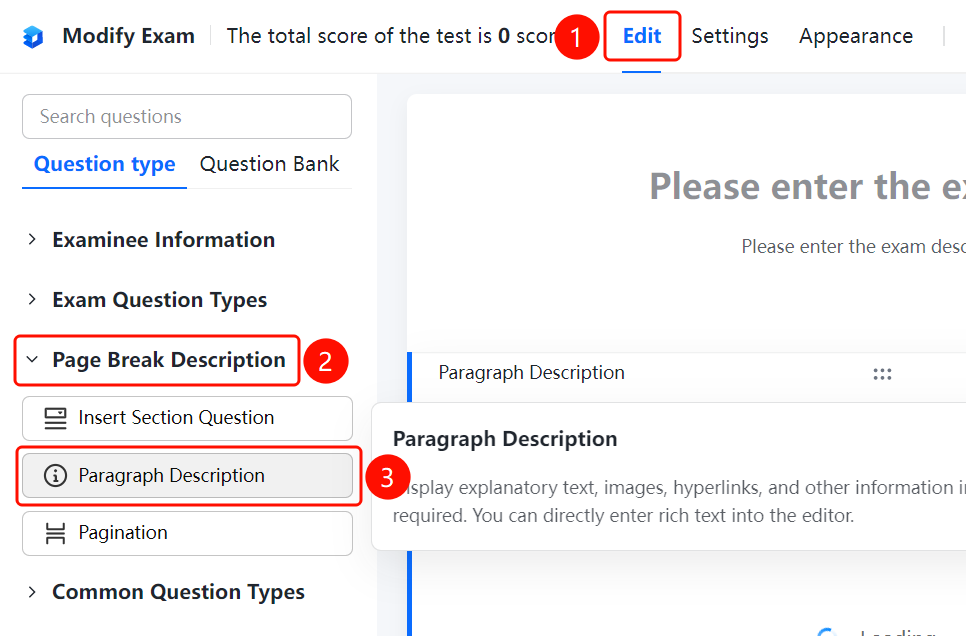
Edit tab > Page Description > Section Description option
- Click the Edit tab at the top.
- Expand the Page Description area in the left panel.
- Click the Section Description option to add a section description to the exam.
- Enter description text, insert images, or hyperlinks and other rich text information in the editor.
FAQ
Question 1: What is the difference between a section description and a regular question?
- Solution: Section descriptions are not meant for respondents to answer. They are only used to display explanatory text, images, hyperlinks, and other information, which is suitable for scenarios such as section descriptions and explanations in forms.
Question 2: What content formats are supported in section descriptions?
- Solution: Section descriptions support rich text editing. You can insert text, images, hyperlinks, etc., to flexibly display various explanatory information.
Question 3: Can section descriptions be placed anywhere in the exam?
- Solution: Yes. Section descriptions can be inserted anywhere in the exam to provide group explanations or overall explanations for questions.
Notes
- Section descriptions are not meant for respondents to answer and are only used to display information.
- Rich text editing is supported, and formatted content can be entered directly in the editor.