Feature Summary
Candidate information is used to collect basic information about candidates, such as phone numbers. It is a required part of the exam form and is located in the "Candidate Information" -> "Candidate Information" area.
Feature Description
| Feature Dimension | Description |
|---|---|
| Premium Limitation | No premium limitation |
| Version Limitation | No version limitation |
Steps
Set Up Candidate Information
Feature Entry
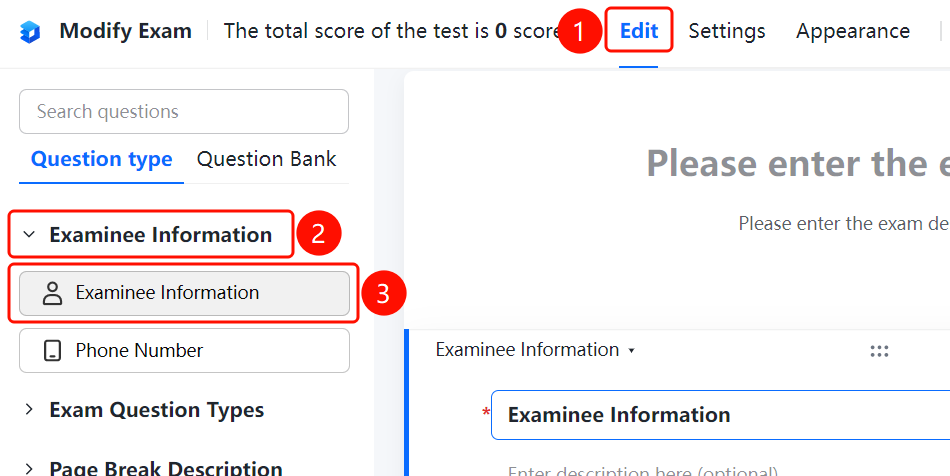
"Edit" tab -> "Candidate Information" -> "Candidate Information" -> Select fields
- Click the "Edit" tab at the top.
- In the left panel, expand the "Exam Forms" area and click "Candidate Information".
- Select the candidate information fields you want to collect, such as "Phone Number".
- Candidates must fill in their information before starting the exam.
FAQ
Question 1: What fields can be set for candidate information?
- Solution: You can set fields such as phone numbers in the candidate information area and select them as needed.
Question 2: Can candidate information be set as required?
- Solution: Yes. After selecting a candidate information field, you can enable the required option in the field settings.
Question 3: Can candidates skip filling in candidate information?
- Solution: If no candidate information fields are selected, candidates can start the exam without filling in any information.
Notes
- Candidate information is an optional configuration for exam forms. We recommend collecting at least the candidate's phone number.