Feature Summary
Submit Button Settings is used to configure the Style and behavior of the submit button at the bottom of a file collection, supporting multi-button submission.
Feature Description
| Feature Dimension | Description |
|---|---|
| Subscription Limit | No subscription limit |
| Version Limit | No subscription limit |
Steps
Add Submit Button Settings
Feature Entry
"Edit" tab → "Submit Button Settings" → "Submit Button Settings" button
- Click the "Edit" tab at the top.
- In the left panel, expand the "Submit Button Settings" area.
- Click the "Submit Button Settings" button to add the submit button settings to the file collection.
- Configure the question parameters as needed.
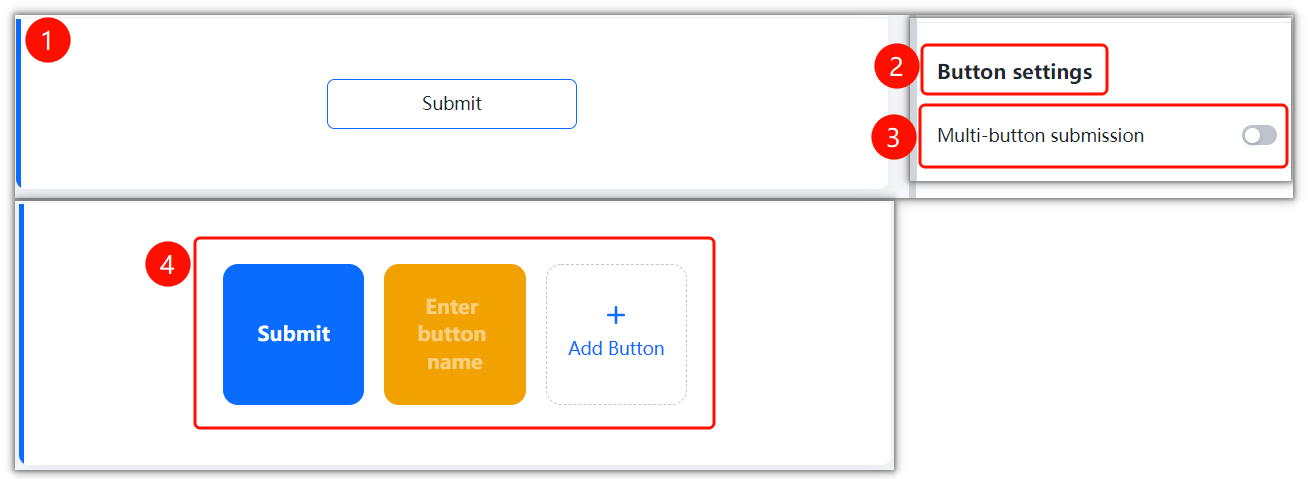
FAQ
Question 1: What is the purpose of Submit Button Settings?
- Solution: Submit Button Settings is used to configure the Style and behavior of the submit button at the bottom of a file collection, supporting multi-button submission.
Notes
- Submit Button Settings is located in the "Submit Button Settings" area.
- Configure the relevant parameters based on your actual needs.