Feature Summary
Response Details is used to view the submission time and answer content of each response collected for a file, helping admins quickly understand the respondents' answering status.
Feature Description
| Feature Dimension | Description |
|---|---|
| Membership Restriction | No membership restriction |
| Version Restriction | No version restriction |
Operation Steps
View Response Details
Feature Entry
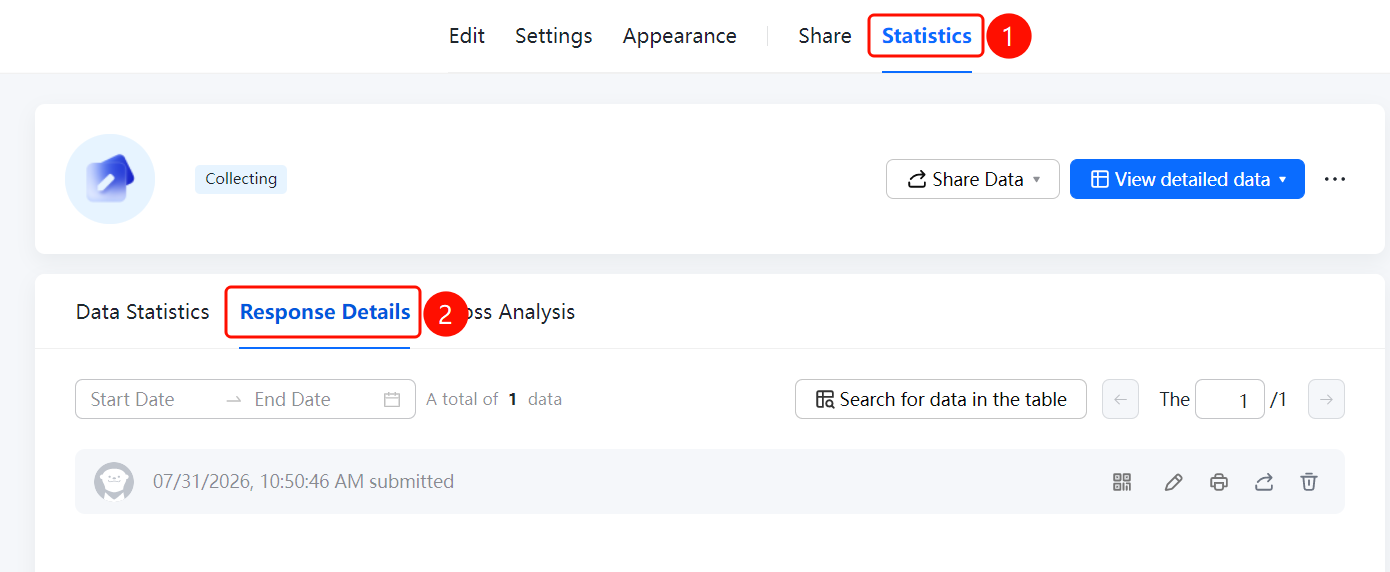
「Statistics」 tab → 「Response Details」 option
- Click the top 「Statistics」 tab
- Click the 「Response Details」 option in the left panel
- Set 「Start Date」 and 「End Date」 at the top of the page to filter the response time range
- Enter keywords in the 「Search in Sheets」 input box to quickly find responses
FAQ
Q1: How to filter responses by time range?
- Solution: Set the 「Start Date」 and 「End Date」 at the top of the 「Response Details」 page.
Q2: How to quickly find a specific response?
- Solution: Enter keywords in the 「Search in Sheets」 input box on the 「Response Details」 page.
Q3: What is the difference between Response Details and Data Statistics?
- Solution: Response Details displays the submission time and answer content of each response individually, while Data Statistics performs aggregate analysis on the overall data.
Notes
- Response Details are displayed in reverse chronological order of submission time
- The total number of responses is displayed at the bottom of the page