Feature Summary
The industry question is used to collect information about the industry in which the respondent works, allowing them to quickly select from preset industry options.
Feature Description
| Feature Dimension | Description |
|---|---|
| Membership Restriction | No membership restriction |
| Version Restriction | No version restriction |
Operation Steps
Adding an Industry Question
Feature Entry
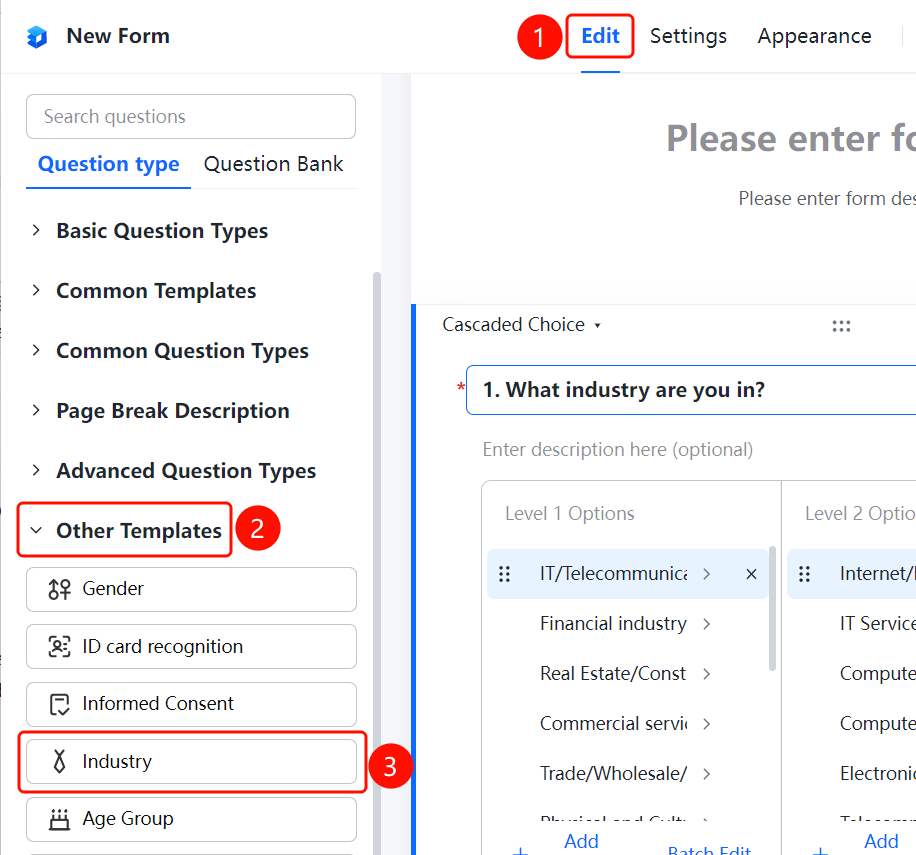
「Edit」 tab → 「Other templates」 → 「Industry」 button
- Click the 「Edit」 tab at the top
- Expand the 「Other templates」 area in the left panel
- Click the 「Industry」 button to add it to the form
FAQ
Q1: What preset options are available for the industry question?
- Solution: The industry question comes with preset common industry classification options, which can also be customized and modified according to actual needs.
Q2: Can the industry options be customized?
- Solution: Yes. Click on the industry question, and you can modify or add industry options in the option editing area.
Q3: What scenarios is the industry question suitable for?
- Solution: The industry question is suitable for scenarios such as surveys and user information collection where statistics need to be compiled by industry dimension.
Notes
- The industry question is a single-choice question type; respondents can only select one industry
- Preset options can be customized and modified according to actual needs