Feature Summary
The License Plate Number question is used to collect respondents' license plate information, supporting both gasoline and electric vehicles.
Feature Description
| Feature Dimension | Description |
|---|---|
| Membership Restriction | No membership restriction |
| Version Restriction | No version restriction |
Operation Steps
Adding a License Plate Number Question
Feature Entry
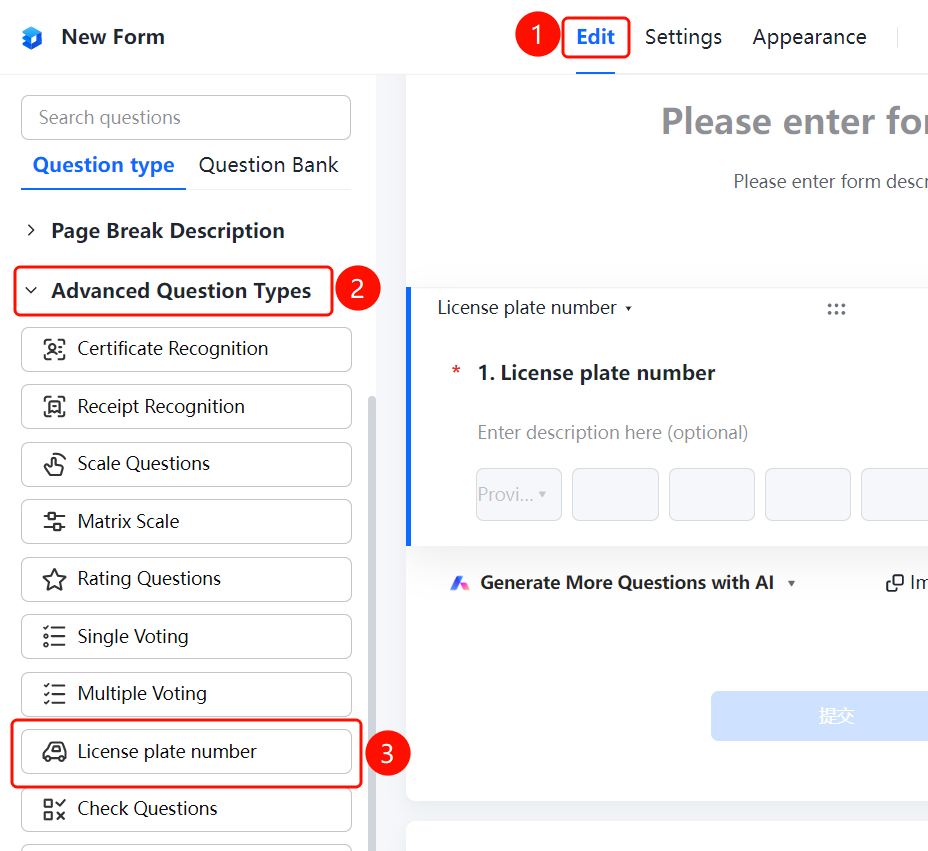
「Edit」 tab → 「Advanced question types」 → 「License Plate Number」 button
- Click the 「Edit」 tab at the top
- Expand the 「Advanced question types」 area in the left panel
- Click the 「License Plate Number」 button to add it to the form
FAQ
Q1: What types of license plates does the License Plate Number question support?
- Solution: The License Plate Number question is used to collect license plate information, supporting both gasoline and electric vehicles.
Q2: How do respondents fill in the license plate number?
- Solution: Respondents can enter the license plate number in the input box, and the system will automatically recognize the license plate format.
Q3: Can the License Plate Number question be set as required?
- Solution: Yes. Click on the License Plate Number question, and enable 「This question is required」 in the 「Basic Settings」.
Notes
- The License Plate Number question is suitable for scenarios such as vehicle registration and parking management
- After the respondent enters the license plate number, the system will automatically validate the license plate format