Feature Summary
The Email question is used to collect respondents' email address information. The system automatically validates the email format to ensure the collected email addresses are valid.
Feature Description
| Feature Dimension | Description |
|---|---|
| Membership Restriction | No membership restriction |
| Version Restriction | No version restriction |
Operation Steps
Add Email Question
Feature Entry
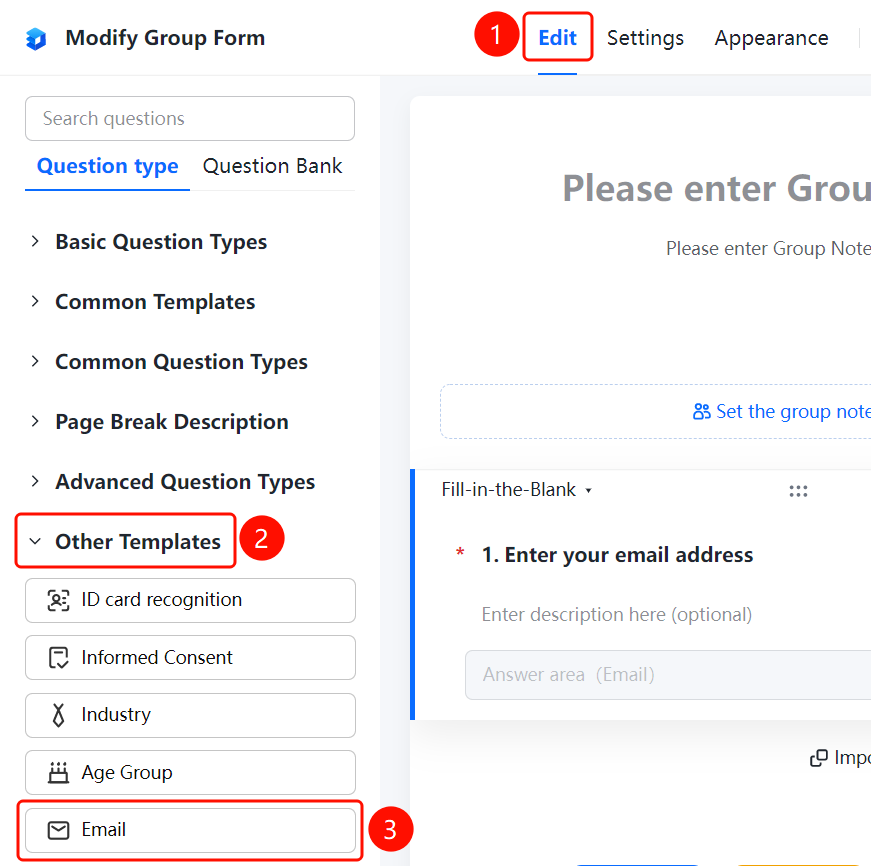
「Edit」 tab → 「Other Templates」 → 「Email」 button
- Click the top 「Edit」 tab
- Expand the 「Other Templates」 area in the left panel
- Click the 「Email」 button to add it to the form
FAQ
Q1: Does the Email question automatically validate the format?
- Solution: Yes. After the respondent enters an email address in the answer area, the system will automatically validate the email format.
Q2: Can the Email question be set as required?
- Solution: Yes. Click the Email question, and enable 「This question is required」 in 「Basic Settings」.
Q3: What scenarios is the Email question suitable for?
- Solution: The Email question is suitable for scenarios where you need to collect respondents' email addresses.
Notes
- The Email question automatically validates the email format to ensure the collected email addresses are valid