Feature Overview
Cross-analysis enables multi-dimensional cross-tabulation of data collected through file collection, allowing users to define row and column dimensions to analyze relationships between different questions.
Feature Description
| Functional Dimension | Description |
|---|---|
| Membership Restrictions | No membership restrictions |
| Version Restrictions | No version restrictions |
Operating Steps
Using Cross Analysis
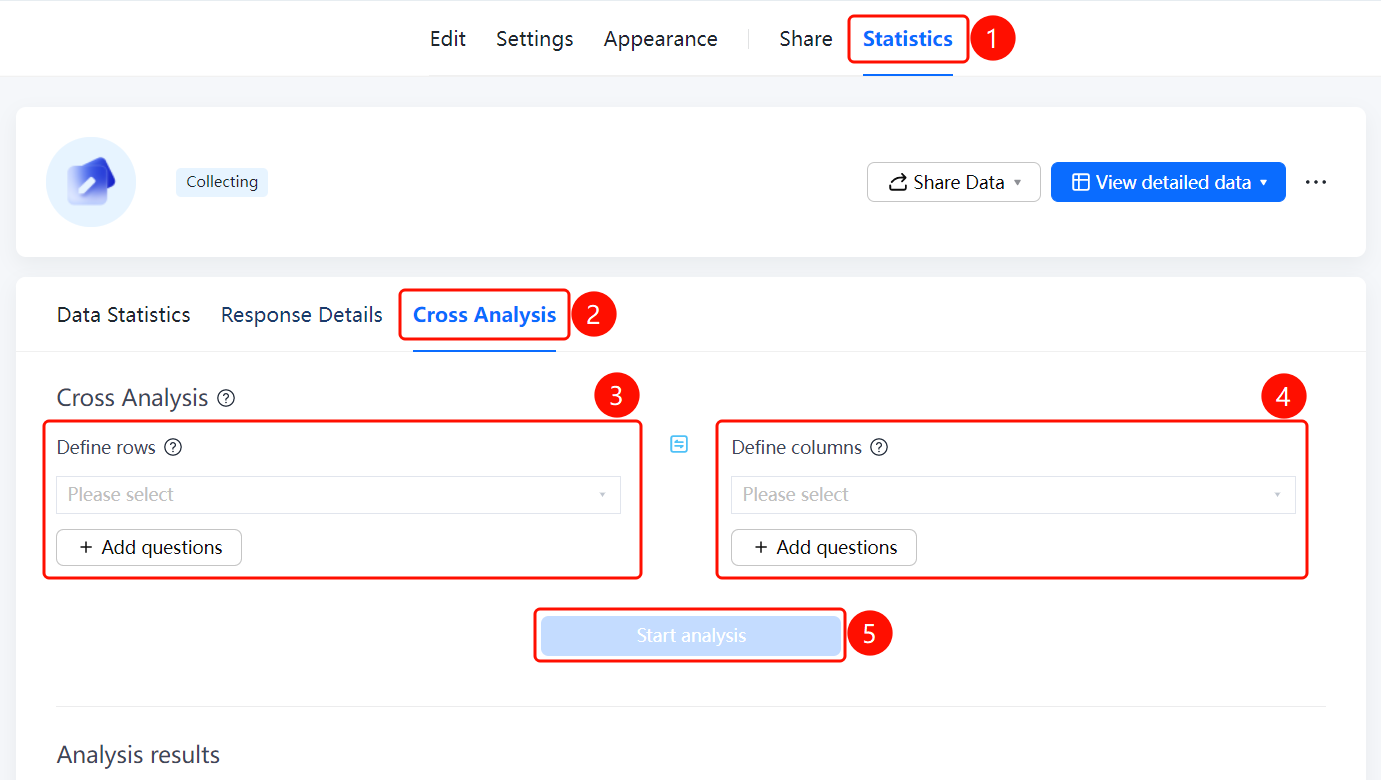
Accessing the Feature"Statistics" tab → "Cross Analysis" option
- Click the "Statistics" tab at the top
- In the left menu, click the "Cross Analysis" option
- Click the "Define Rows" dropdown and select the question to be used as the row dimension
- Click the "Define Columns" dropdown and select the question to be used as the column dimension
- Click "Add Question" to include additional analysis dimensions
- Click the "Start Analysis" button to view the results below
Frequently Asked Questions
Q1: What is the purpose of cross-tabulation analysis?
- Solution: Cross-tabulation analysis allows you to perform statistical analysis by combining data from two or more questions, helping you examine relationships between different questions—such as analyzing the distribution patterns among various answer options.
Q2: How do I select dimensions for cross-tabulation analysis?
- Solution: Click the dropdown menus under "Define Rows" and "Define Columns" to select the questions you want to analyze. You can also click "Add Question" to include additional dimensions.
Q3: How can I view the analysis results?
- Solution: After setting up your row and column dimensions, click the "Start Analysis" button. The results will be displayed in the "Analysis Results" section below.
Notes
- Cross-tabulation analysis applies only to question types with predefined options, such as multiple-choice or dropdown questions.
- At least two dimensions (one for rows and one for columns) must be defined before analysis can proceed.