Feature Overview
The related data question links to a table, allowing respondents to select one or more rows of data from the table as their input and submit it. The data is updated in real time, ensuring accuracy and preventing errors or incorrect entries.
Feature Description
| Functional Dimension | Description |
|---|---|
| Membership Restrictions | No membership restrictions |
| Version Restrictions | No version restrictions |
Operating Steps
Adding a Linked Data Question
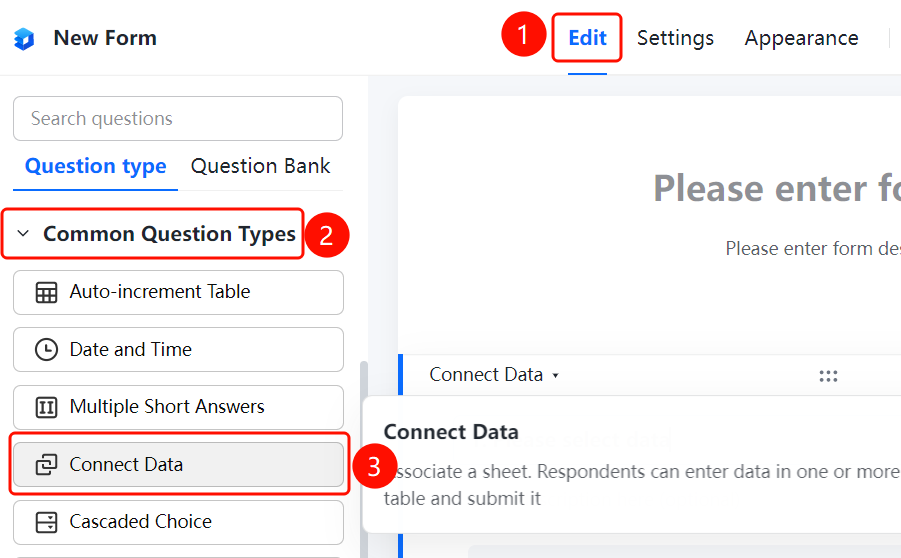
Access Path"Edit" tab → "Common Question Types" → "Linked Data" button
- Click the "Edit" tab at the top
- Expand the "Common Question Types" section in the left panel
- Click the "Linked Data" button to add a linked data question to the file collection
- Enter the question content in the question editing area, for example, "Please select data"
Frequently Asked Questions
Q1: What are the benefits of linking data?
- Solution: Data is updated in real time—when table content changes, the form references automatically update as well. Entering a phone number or device ID can automatically identify the submitter's information. All user-submitted data comes directly from the table, ensuring accuracy and reliability.
Q2: What data sources does linked data support?
- Solution: You can select existing tables (cloud documents), upload local spreadsheets, or use sample tables for linking.
Q3: Will updates to the linked table be automatically synchronized?
- Solution: Yes. After linking data, any changes made to the table will automatically reflect in the form, ensuring real-time data synchronization.
Notes
- Linking data ensures accurate and error-free data collection, preventing incorrect or random entries.
- Changes in the linked table’s data are automatically synced to the form.