Feature Summary
The cross-tabulation feature is used to perform multi-dimensional cross-comparison analysis on data collected through forms, helping users discover relationships between different questions.
Feature Description
| Feature Dimension | Description |
|---|---|
| Membership Restriction | No membership restriction |
| Version Restriction | No version restriction |
Operation Steps
Performing Cross-Tabulation
Feature Entry
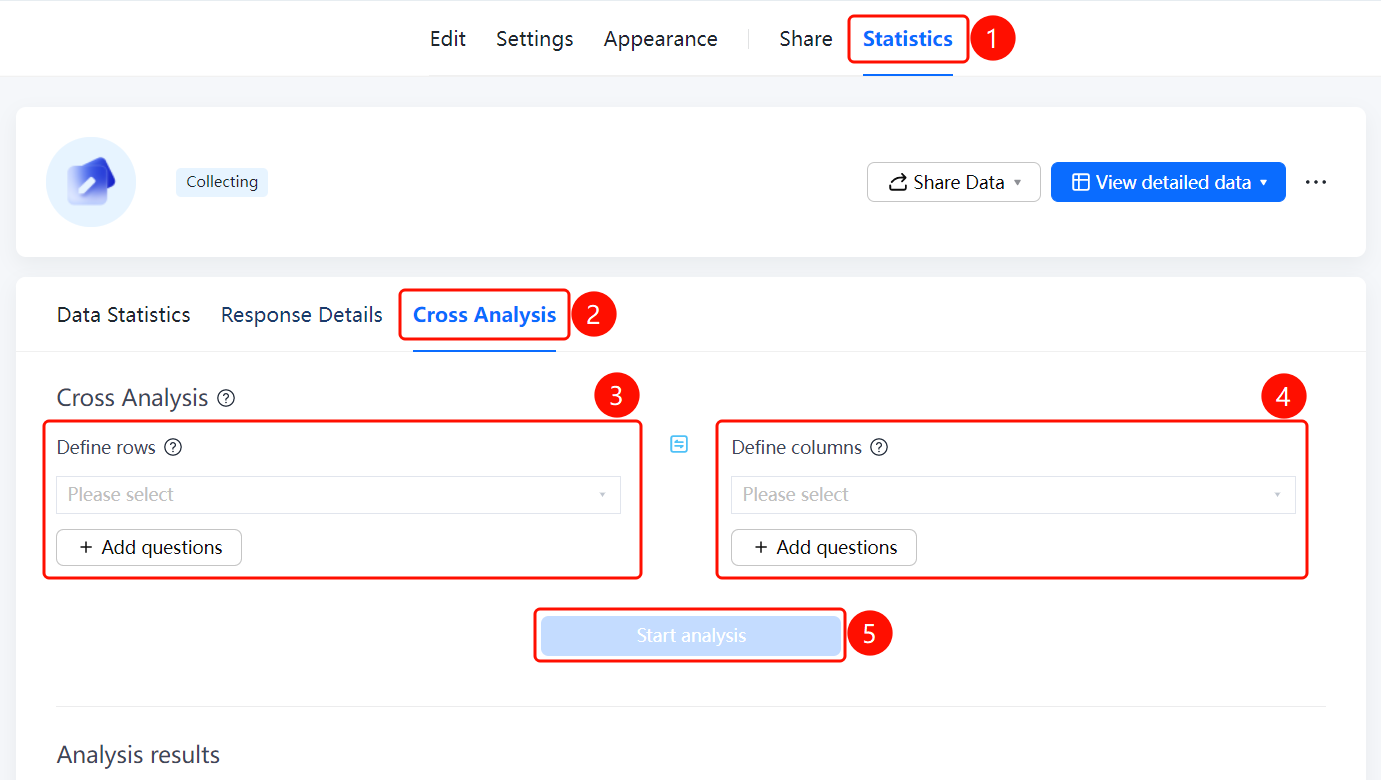
"Statistics" tab → "Cross-Tabulation" tab
- Click the top "Statistics" tab
- Click the "Cross-Tabulation" tab
- In the "Define Row" area, select the row dimension question. You can click "+ Add Question" to add more.
- In the "Define Column" area, select the column dimension question. You can click "+ Add Question" to add more.
- Click the "Start Analysis" button to view the cross-tabulation results.
FAQ
Q1: What is the purpose of cross-tabulation?
- Solution: Cross-tabulation can cross-compare data from two or more questions, helping to discover relationships and patterns between different dimensions.
Q2: How do I add analysis dimensions?
- Solution: Click the "+ Add Question" button in the "Define Row" and "Define Column" areas respectively, and select the questions you want to analyze.
Q3: Which question types are supported by cross-tabulation?
- Solution: Cross-tabulation supports question types with options, such as single-choice, multiple-choice, and dropdown questions, as analysis dimensions.
Notes
- A certain amount of data must be collected first to perform meaningful cross-tabulation.
- It is recommended to select questions with categorical properties as cross-tabulation dimensions.