Feature Summary
The Product question is used to display products and prices. Respondents can select the desired quantity of each product, and the total price is automatically calculated.
Feature Description
| Feature Dimension | Description |
|---|---|
| Membership Restriction | No membership restriction |
| Version Restriction | No version restriction |
Steps
Add a Product Question
Feature Entry
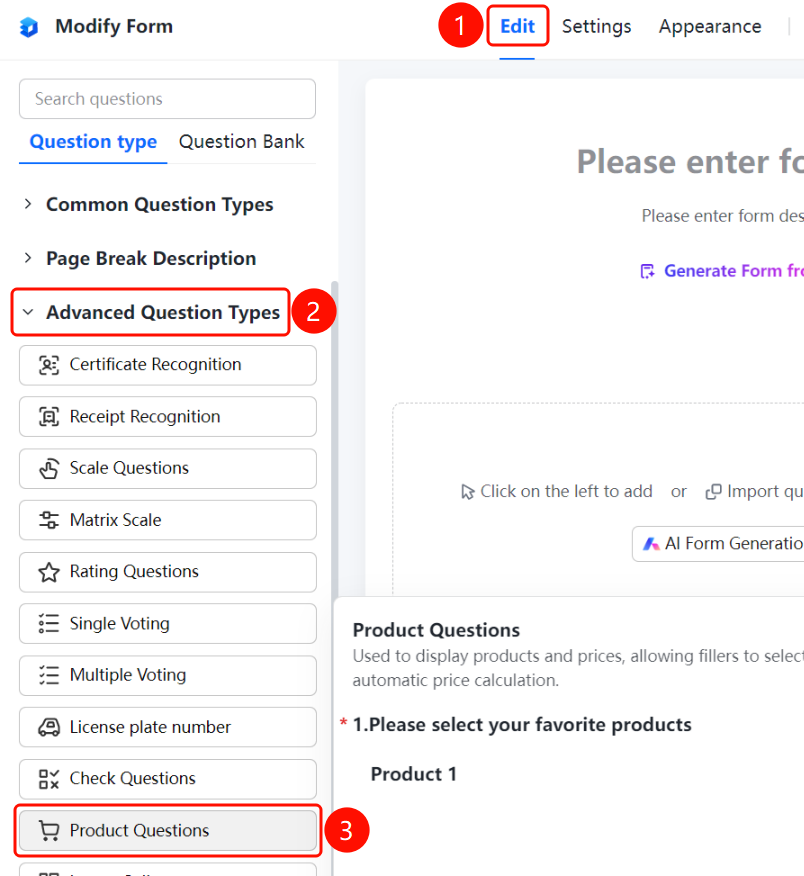
「Edit」tab → 「Question Type」tab → 「Advanced Question Types」 → 「Product」button
- Click the 「Edit」 tab at the top
- In the left panel, expand the 「Advanced Question Types」 section
- Click the 「Product」 button to add a Product question to the form
- Set the product name and price in the editing area on the right
- Respondents can use the plus/minus buttons to select product quantities, and the system automatically calculates the total price
FAQ
Q1: What payment methods does the Product question support?
- Solution: The Product question is primarily used for product display and quantity statistics. Specific payment methods need to be configured separately based on business requirements.
Q2: How many products can be added?
- Solution: The Product question supports adding multiple product items, and each product can have its name and price set independently.
Q3: Can the product price be modified?
- Solution: Yes, you can click on the Product question in the form editing page to modify the name and price of each product.
Notes
- The Product question is suitable for simple product selection and quantity statistics scenarios
- Each product item supports independent name and price settings