Feature Summary
The Data Dashboard feature provides AI-powered intelligent analysis, rich charts, and custom statistics, helping users intuitively view and analyze data collected through forms.
Feature Description
| Feature Dimension | Description |
|---|---|
| Membership Restriction | No membership restriction |
| Version Restriction | No version restriction |
Steps
Viewing the Data Dashboard
Feature Entry
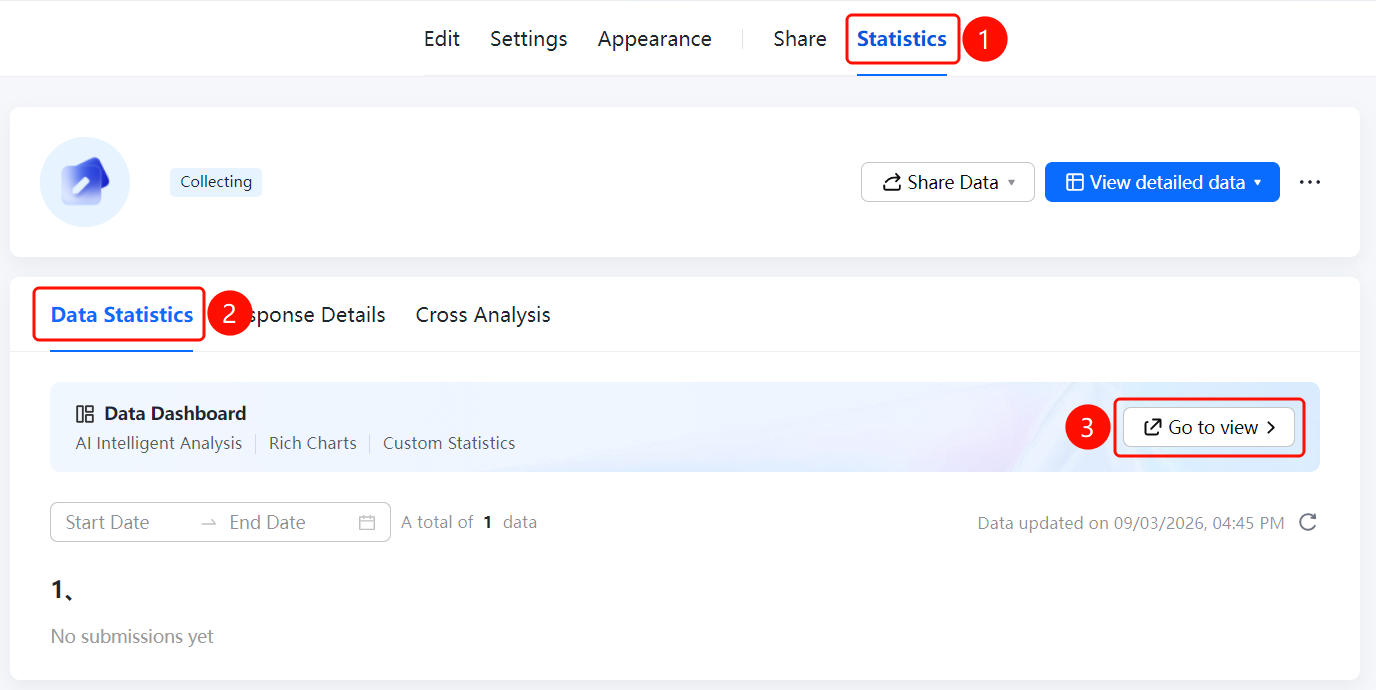
「Statistics」tab → 「Data Statistics」tab → 「Data Dashboard」 → 「Go to View」button
- Click the top 「Statistics」 tab
- Click the 「Data Statistics」 tab
- In the 「Data Dashboard」 area, click the 「Go to View」 button
- Enter the Data Dashboard page to view AI-powered intelligent analysis and chart displays
FAQ
Q1: What features does the Data Dashboard include?
- Solution: The Data Dashboard includes AI-powered intelligent analysis, rich chart displays, and custom statistics features, helping users analyze data comprehensively.
Q2: Does the Data Dashboard update data in real time?
- Solution: Yes, the Data Dashboard automatically updates statistical results based on the latest form submission data.
Q3: Can I customize the display content of the Data Dashboard?
- Solution: Yes, the Data Dashboard supports custom statistics, allowing users to adjust the displayed charts and data dimensions according to their needs.
Notes
- The Data Dashboard requires a certain amount of data to be collected before it can display meaningful statistical results
- It is recommended to use the Data Dashboard for analysis when the data volume is sufficient