Feature Summary
The Data Statistics feature is used to view all data collected by a form, supporting filtering by date and data volume statistics.
Feature Description
| Feature Dimension | Description |
|---|---|
| Membership Restriction | No membership restriction |
| Version Restriction | No version restriction |
Operation Steps
Viewing Data Statistics
Feature Entry
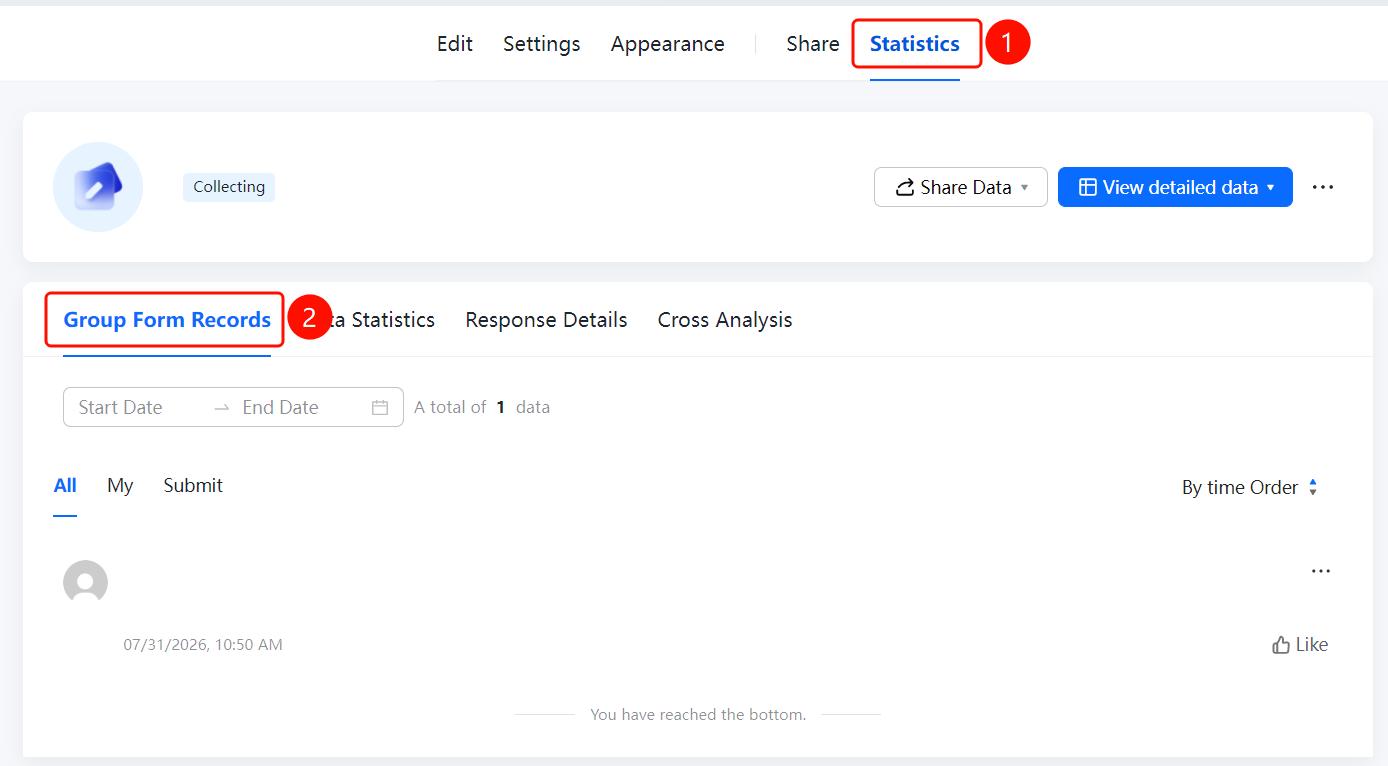
「Statistics」 tab → 「Data Statistics」 tab
- Click the 「Statistics」 tab at the top
- Click the 「Data Statistics」 tab
- View the data statistics overview on the page, including the total data volume
- You can filter data for a specific time period using 「Start Date」 and 「End Date」
FAQ
Q1: What information does Data Statistics display?
- Solution: Data Statistics displays the total amount of data collected by the form, statistical results for each question, and information such as the data update time.
Q2: How to filter data for a specific date?
- Solution: Click the date filter on the Data Statistics page, select the start date and end date to filter data for the specified time period.
Q3: How often is Data Statistics updated?
- Solution: Data Statistics updates in real time. The data refreshes automatically each time a new form submission is received.
Notes
- The data volume displayed on the Data Statistics page is the result of real-time statistics
- For more detailed analysis, you can use the Data Dashboard or Cross-Analysis feature