Feature Summary
Paragraph description is used to display explanatory text, images, hyperlinks, and other information in a form, suitable for form section descriptions and explanatory scenarios.
Feature Description
| Feature Dimension | Description |
|---|---|
| Membership Restriction | No membership restriction |
| Version Restriction | No version restriction |
Steps
Add Paragraph Description
Feature Entry
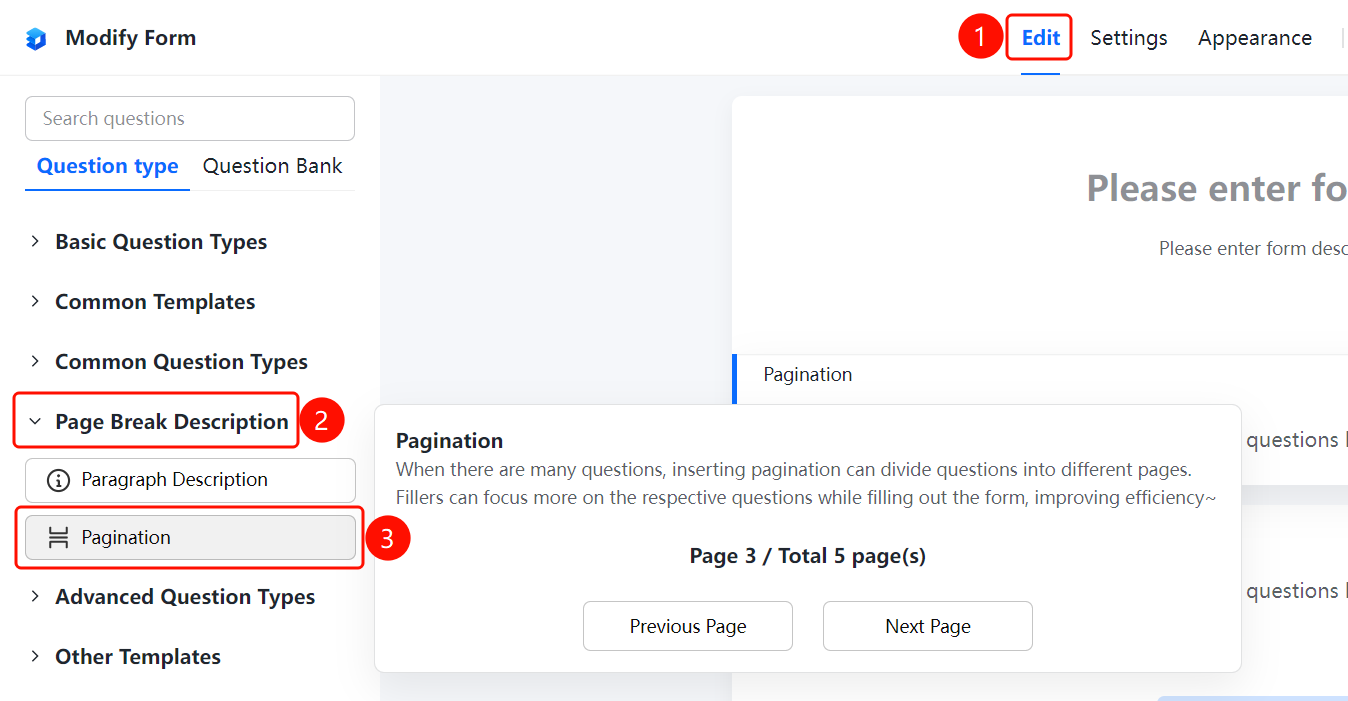
「Edit」tab → 「Question Types」tab → 「Page Description」→ 「Paragraph Description」button
- Click the top 「Edit」 tab
- In the left panel, expand the 「Page Description」 area
- Click the 「Paragraph Description」 button to add the paragraph description to the form
- Enter rich text information in the editor, supporting text, images, and hyperlinks
FAQ
Q1: What is the difference between paragraph description and plain text?
- Solution: Paragraph description supports rich text editing, allowing you to insert multimedia content such as images and hyperlinks, while plain text only supports plain text.
Q2: Does the paragraph description need to be filled in by the respondent?
- Solution: No, the paragraph description is only used to display information and will not require the respondent to input any content.
Q3: Can I insert images in the paragraph description?
- Solution: Yes, the paragraph description supports inserting rich text content such as images, text, and hyperlinks in the editor.
Notes
- Paragraph description is suitable for section descriptions, usage instructions, and other scenarios in forms
- Paragraph description does not count toward the number of questions and does not affect data statistics