Feature Summary
The matrix question packages several sub-questions into one large question, offering a more polished appearance. It is commonly used for personal information, exam questions, and similar scenarios.
Feature Description
| Feature Dimension | Description |
|---|---|
| Membership Restriction | No membership restriction |
| Version Restriction | No version restriction |
Steps
Adding a Matrix Question
Feature Entry
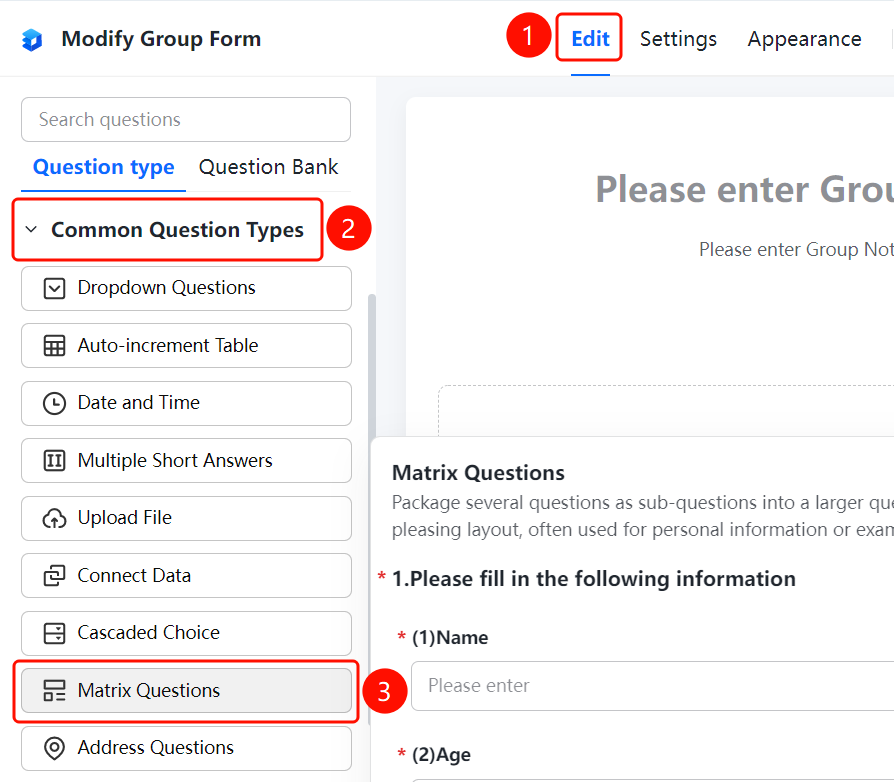
"Edit" tab → "Question Type" tab → "Common Question Types" → "Matrix Question" button
- Click the "Edit" tab at the top
- In the left panel, expand the "Common Question Types" area
- Click the "Matrix Question" button to add a matrix question to the form
- In the editing area on the right, set the sub-question content. Multiple sub-question types are supported, such as text input and single choice
- You can add multiple sub-questions like name, age, and gender to form a complete matrix question
FAQ
Q1: What is the difference between a matrix question and a regular question?
- Solution: A matrix question can combine multiple sub-questions into one large question, providing a more visually appealing overall display. It is suitable for scenarios where information needs to be collected in groups.
Q2: What sub-question types are supported by the matrix question?
- Solution: The matrix question supports various sub-question types, including text input, number input, single choice, and multiple choice.
Q3: How do I add a sub-question?
- Solution: In the matrix question editing area, click the add button to create a new sub-question and set its type and content.
Notes
- The matrix question is suitable for scenarios that require grouped display, such as collecting personal information and exam questions
- Each matrix question can contain multiple sub-questions of different types