Feature Summary
Response Detail is used to view the complete content of each form submission, supporting filtering by date and page-by-page browsing.
Feature Description
| Feature Dimension | Description |
|---|---|
| Membership Restriction | No membership restriction |
| Version Restriction | No version restriction |
Operation Steps
View Response Detail
Feature Entry
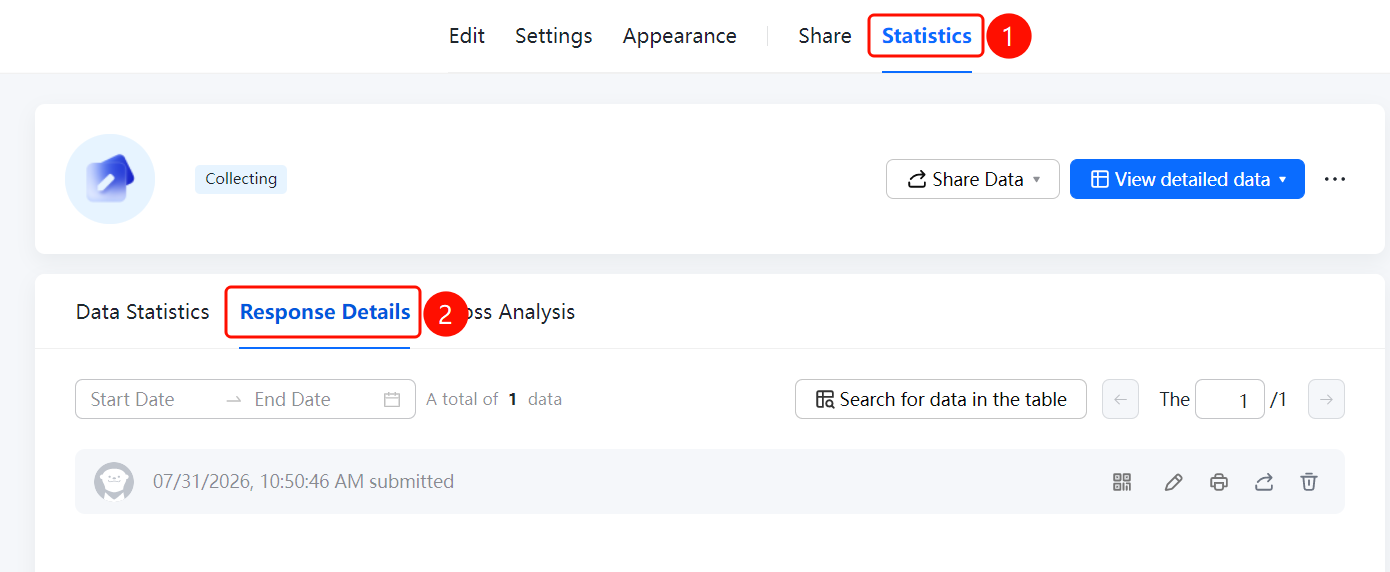
"Statistics" tab → "Response Detail" tab
- Click the "Statistics" tab at the top
- Click the "Response Detail" tab
- View the complete response content of each submission on the page
- You can filter responses for a specific time period using the date filter
- Use the pagination controls to browse different response records
FAQ
Q1: What information does Response Detail display?
- Solution: Response Detail displays the complete content of each submission, including the filled-in results for all questions and the submission time.
Q2: How to view responses for a specific date?
- Solution: Use the date filter on the Response Detail page, select a start date and an end date to filter responses for the specified time period.
Notes
- Responses are sorted by submission time, with the latest responses displayed first
- Each response displays the complete filled-in content, making it easy to review one by one