Feature Summary
The form title feature is used to set the title and description of a form, displayed at the top of the form to help respondents understand its purpose.
Feature Description
| Feature Dimension | Description |
|---|---|
| Membership Restriction | No membership restriction |
| Version Restriction | No version restriction |
Operation Steps
Setting the Form Title
Feature Entry
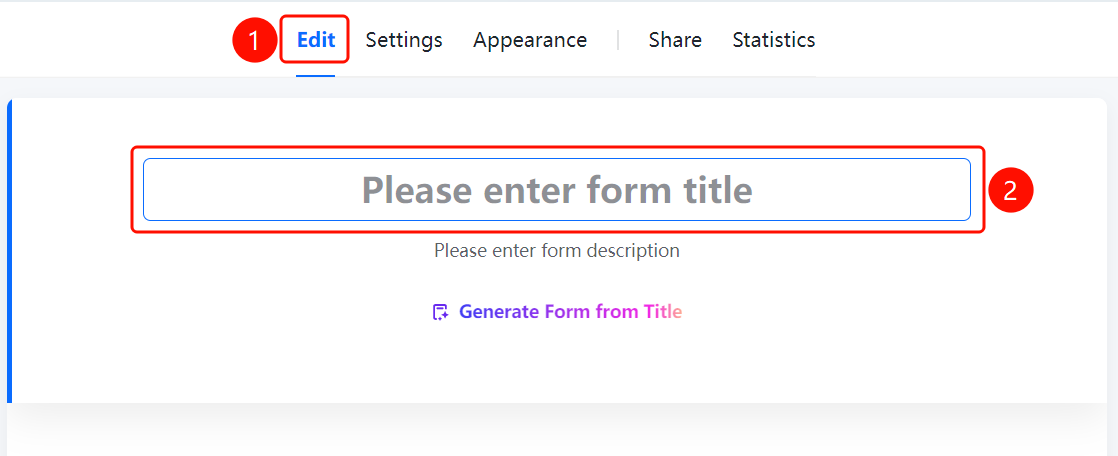
「Edit」 tab → Form title area
- Click the top 「Edit」 tab
- Click the 「Please enter form title」 input box in the title area at the top of the page
- Enter the form title content
- Enter the form title description in the 「Please enter form description」 area below
FAQ
Q1: What is the purpose of the form title and description?
- Solution: The form title and description are displayed at the top of the form, helping respondents quickly understand the form's purpose and filling requirements.
Q2: Can the form title be modified?
- Solution: Yes, you can modify the form title and description by clicking the title area on the appearance page.
Q3: Is the form description mandatory?
- Solution: No, the form description is optional and can be filled in as needed.
Notes
- It is recommended to keep the form title concise and clear, directly stating the form's purpose
- The form description can be used to supplement filling requirements or notes