Feature Summary
The rating question is commonly used in scoring scenarios. Users can rate from 1 to 5 points, making it suitable for satisfaction surveys and similar scenarios.
Feature Description
| Feature Dimension | Description |
|---|---|
| Membership Restriction | No membership restriction |
| Version Restriction | No version restriction |
Operation Steps
Adding a Rating Question
Feature Entry
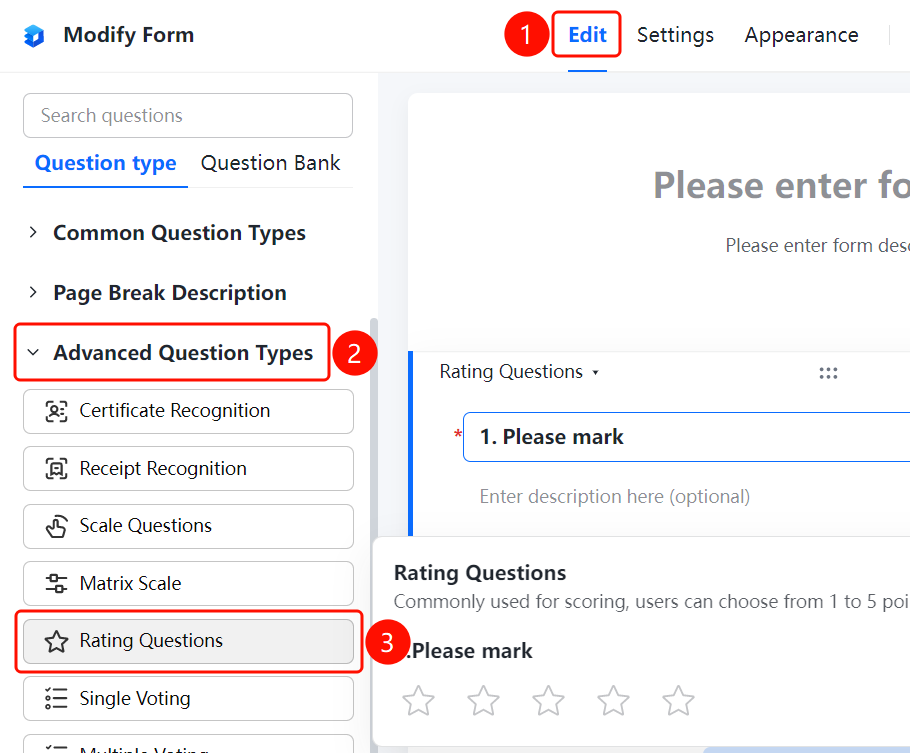
「Edit」tab → 「Question Type」tab → 「Advanced Question Types」→ 「Rating Question」button
- Click the top 「Edit」 tab
- Expand the 「Advanced Question Types」 area in the left panel
- Click the 「Rating Question」 button to add the rating question to the form
- Set the question title and description in the right editing area
- Respondents can rate from 1 to 5 points by clicking the stars
FAQ
Q1: What is the rating range of the rating question?
- Solution: The rating question supports a default rating range of 1 to 5 points. Users rate by clicking the stars.
Q2: What scenarios are suitable for the rating question?
- Solution: The rating question is suitable for scenarios that require scoring, such as satisfaction surveys, service evaluations, and product ratings.
Q3: Can the rating score range be modified?
- Solution: The rating score range and style can be adjusted on the rating question editing page.
Notes
- The rating question is suitable for simple satisfaction surveys and service evaluations
- Rating results will automatically calculate the average score and distribution