Feature Summary
The check-in title is used to set the title and description of the check-in form, serving as the basic information of the check-in form.
Feature Description
| Feature Dimension | Description |
|---|---|
| Member Restriction | No member restriction |
| Version Restriction | No version restriction |
Operation Steps
Setting the Check-in Title
Feature Entry
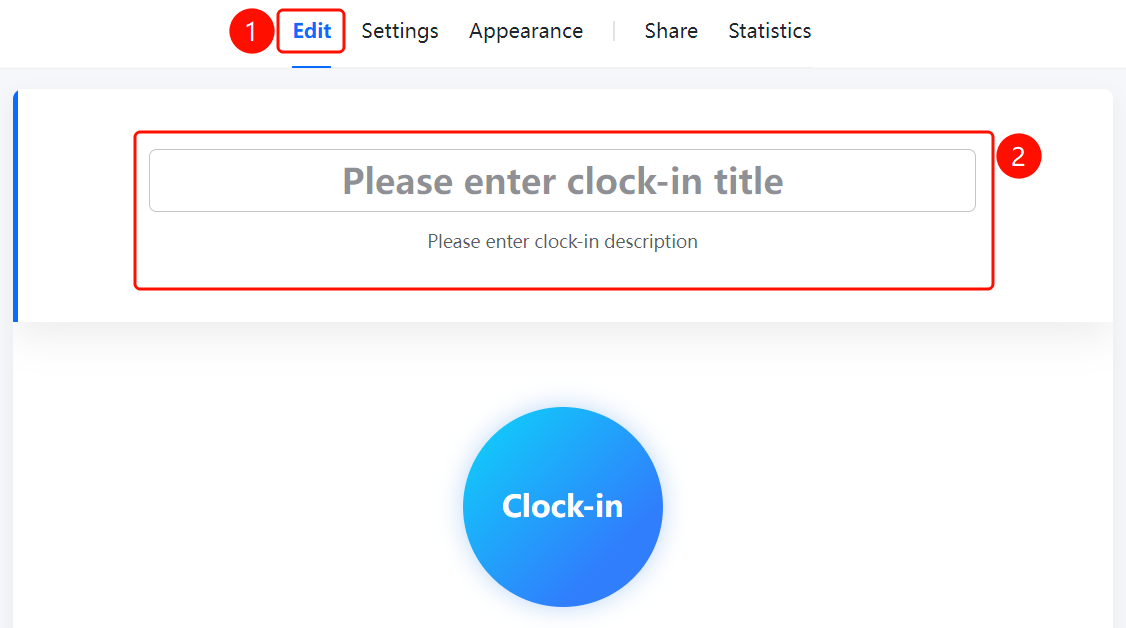
"Edit" tab → "Please enter check-in title" input box
- Click the "Edit" tab at the top
- Enter the check-in title in the "Please enter check-in title" input box
- Enter the check-in description in the "Please enter check-in description" input box (optional)
FAQ
Q1: Can the check-in title be modified?
- Solution: Yes. Under the "Edit" tab, click the "Please enter check-in title" input box to modify the title content.
Q2: Is the check-in description mandatory?
- Solution: No. The check-in description is optional and can be filled in with detailed instructions for the check-in as needed.
Q3: What is the purpose of the check-in title?
- Solution: The check-in title is used to identify the name of the check-in form, making it easier for respondents to recognize and find.
Notes
- The check-in title is the basic information of the check-in form; it is recommended to fill in a clear and explicit title
- The check-in description is optional and can be used to supplement the check-in instructions